Firefox 3.5 vs. Chrome 3 Showdown, Round 2: Are bookmarks outmoded?


It's a trend we're noticing more and more with folks who use Web browsers: Google Search is becoming so ubiquitous that people are comfortable with typing a query rather than referencing a bookmark, to relocate a page they remember. It saves them the trouble of having to save the page in the first place. You think I'm kidding? Two of the search phrases that land Google users on Betanews most often are "beta news" and "Betanews."
So for a lot of people, the bookmarks file is becoming almost atrophied, a disused collection of stuff so old that the Internet Archive might have to look up its contents in a box of floppy disks. When using the browser's bookmarks manager becomes more troublesome, or just simply more time-consuming, than a Google query, a user may simply choose the latter.
Perhaps Google already came to that conclusion, or perhaps it would simply prefer users to store their bookmarks on its Web-based service. This is the only explanation I can attribute to the fact that the Chrome browser is coming up on one year of everyday public use without its Bookmark Manager feature developing even the simplest functionality.
Here's what I mean: I went ahead and imported my version of the Ancient Historical Bookmarks file into both the latest beta of Google Chrome 3 and Tuesday's final release of Mozilla Firefox 3.5, so that they both have the same set of bookmarks (other than what the manufacturers install there automatically). Both browsers' Bookmark Managers have the same names, and their windows are laid out quite similarly.
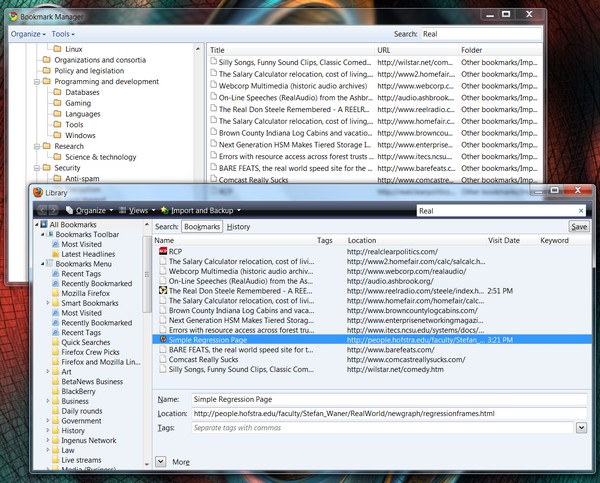
Knowing I might want to consider weeding out any 10-year-old links to RealNetworks sound files in my archive, I started out conducting a search for real. Both browsers are capable of turning up entries that contain those four letters in that order, at some point. But right away, I see the difference: Firefox pulled up 13 items and Chrome only 12, from the same bookmarks file.
What's the extra bookmark? It's an item called "Simple Regression Page," which produces a line of a graph that best fits a set of variable conditions. The letters "real" don't appear in that page's title whatsoever, so why did Firefox pull it up? Because "real" appears deep in the page's URL. Since the title page of a Web site may not actually contain the title of the site (it's been known to happen), and a URL is presumably more likely to contain that title, Firefox's bookmark system searches both entries simultaneously.
However, Chrome 3 did pull up "RCP," which was my abbreviation for RealClearPolitics.com as it appears on my links bar. It didn't have "real" in its bookmark title, though it does appear in the URL. But not deep in the URL, as was the case with the Simple Regression Page.
When Firefox first pulled up 13 entries and Chrome 12, I wanted to know right away, which one was the odd man out? The easiest way for me to figure out would be to click on the Name bar at the top -- usually that sorts by name. And for Firefox, it does. Would you believe you can't sort bookmarks in Chrome 3; they can only appear in the retrieval space in the same order as they appear in the bookmarks list? You can click the Name bar in Chrome 3 until you've worn a hole in your mouse; it's not going to do anything.
Now, you have to wonder, how long has this obvious omission remained in Chrome -- a sort button that doesn't sort? Hasn't anyone reported this? Isn't the purpose of beta testing to find problems so they may then be remedied?
Or perhaps it's the purpose of Google's support forums to help users grieve and come to terms with omitted features. Here is a support thread topic header from December 2008: "There is no way to sort bookmarks in the bookmarks folder. By name, by most recent, or otherwise." There are dozens of responses to this complaint -- a litany of comments, all of them from Chrome users only, the final one in the set having been posted last May 10.
That entry contains a link to a Chrome plug-in -- quite literally, an independent British programmer last April created the bookmark sorter that Google neglected to include with its own browser.
To recap: In less time than it takes an entire corporation, using what is purported to be an open programming process, to re-insert a feature that has been an historical component of a competitive browser (which, by the way, is actually produced by some of the very same people, so they would have intimate knowledge of that component), a theology student in Monmouth, in his spare time in-between running a youth Bible study group and building motorsports racing simulations, comes up with a plug-in that, at least for some users, fills that feature gap. What is wrong with this picture?
Next: Can Chrome fight back with a versatile address bar?