What YouTube's new 16:9 aspect ratio means for users

There are some significant and some insignificant aspects of YouTube's adjusted main screen. The service's "embrace" of widescreen today, we discovered, doesn't change much besides what you see on the surface.
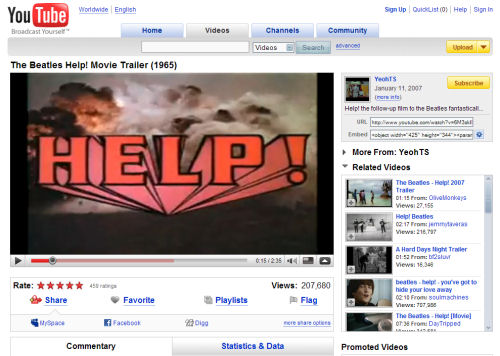
A number of videos with 16:9 widescreen ratio have already been featured on YouTube, and long-time users with widescreen monitors know that YouTube already supported that ratio whenever a video is expanded to full screen mode. Movie trailers are among the content that YouTube has supported in their native aspect ratios.
Until yesterday, the size of that content on YouTube's main player page has been "letterboxed" to fit within a 4:3 box -- one with a CRT's aspect ratio. Now, YouTube is reversing which videos it chooses to "letterbox," by presenting its main page with a bigger 16:9 display. From this point on in the main page, videos in the 4:3 ratio are displayed with black borders along the left and right sides, though without shrinking them any smaller than they had been displayed before. But uploaded videos with 16:9 aspect ratio will be displayed within a larger area.
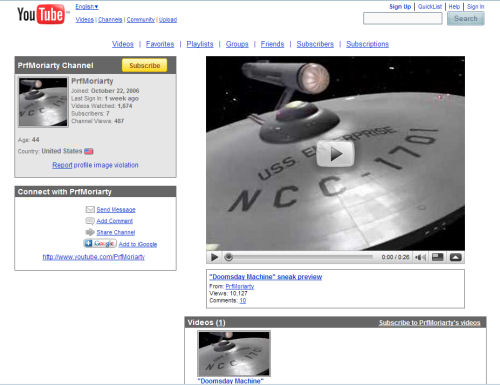
That's on the main page, at least for now, we discovered. For users with their own private channels, we found that videos remain featured in the 4:3 aspect ratio. Meanwhile, some of the commercial channels on YouTube had already begun implementing widescreen viewing options over a month ago.
The methodology for embedding videos within other pages also remains the same. This morning, we noticed the default values that YouTube provides when writing its automatic HTML <object> code remain width = "425" height = "344", even for videos that are natively widescreen. Coders may, of course, change these default values to suit their own pages.
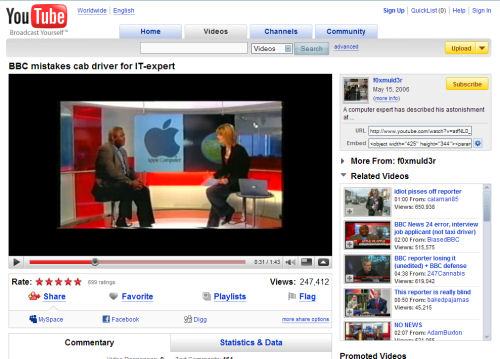
What YouTube's switch cannot change, unfortunately, is the situation where widescreen videos were changed to 4:3 aspect ratio prior to their having been uploaded...in order that they could fit within the 4:3 viewer YouTube originally provided by default. Today, we noticed that such reworked videos appear with black borders all around them, as YouTube now adds letterboxing on the "wings," if you will, in addition to those along the top and bottom that were already present.
YouTube's behavior when expanding videos to full screen does not appear to have changed; the system still expands the video to fit the size of your monitor as best it can.