Adobe Web Services test run: ConnectNow and Create PDF

By Tim Conneally | Published June 2, 2008, 4:37 PM

Part of Adobe's beta of Acrobat.com, ConnectNow is a Web Conferencing tool, and Create PDF gives you a way to build PDF files from anyplace, whether or not you have access to Acrobat software.

Adobe's ConnectNow is a tool which allows an administrator to create a virtual meeting room where users log on and communicate with each other using a single URL.

If you're interested in trying out Adobe's ConnectNow today...well, good luck. You may face a little wait, as today's traffic has been causing refusals of service. Traffic aside, this webtop conferencing application offers numerous fast and friendly meeting features.

The host of the ConnectNow session needs to download an add-in, but fortunately, it only takes a matter of seconds for the host to download it and start the service. To become a participant in the conference, a user only needs to point his browser at the host's URL.

Once the session begins, all participants can see the host's screen. When using multiple monitors, ConnectNow allows the host to choose which screen is shared. In the ConnectNow window, several "pods" can be activated to enhance the meeting: video or VoIP chat, an in-window chat (not compatible with 3rd party IM clients), a whiteboard, and a file sharing window. The host can also allow meeting attendees to assume remote access to the host's shared screen.
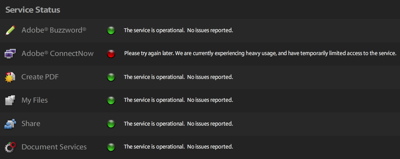
ConnectNow received heavy traffic today

The free version only allows three people (including the host) to participate, but Adobe offers Connect Standard and Pro versions, the latter of which allows as many as 1,500 participants, suitable for large scale virtual class- and boardrooms.
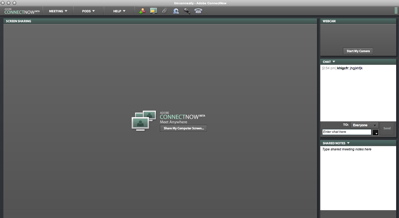
ConnectNow host window

Create PDF is perhaps the most straightforward product in Adobe's Acrobat.com beta. The title of the application states exactly what it does: create PDFs. Create PDF allows conversion of text documents (TXT, PS, RTF), Microsoft Office (DOC, XLS, PPT, PRJ), OpenOffice (ODT, ODP, ODS, ODG, ODF), StarOffice (SWX, SXI, SXC, SXD, STW), WordPerfect (WPD), and image files (BMP, GIF, JPEG, TIFF, PNG).

Users may only convert files 200 MB in size or smaller and are only allowed a limited number of conversions. Each conversion is saved in the user's Acrobat.com account and can be given public or private viewing privileges. The document view has two buttons labeled "Copy URL" and "Copy Embed Code" which copy links to the PDF directly to the user's clipboard when clicked.

Both tools are useful additions to the webtop landscape, however with their reduced functionality, they behave as less as standalone Web tools, and more as promotions for Adobe's full-featured software.

Comments

View comments by with a score of at least

please pdf readers for me

Score: 0

|

Collaboration related many other sites have things in common, I am
seeing companies like showmypc provide tools and services for doing
exactly what you suggested above free and they let you build you own inhouse collaboration system.

A life saver here at http://showmypc.com

Score: 0

|

Radmin Server can already do the same thing. You can log in to the host computer, create PDF files, transfer files, enjoy remote desktop etc, and there's no queue!

Users can even be assigned access priviliges by the host, and chat at the same time - all for free! (The viewers are free - the server utility costs about $20.

Adobe is about 4 years behind Radmin Server.

WWW.AMW1.com

Score: 0

|

I uploaded a 20KB plain text file. Three minutes have passed and it is still converting to PDF. So what's wrong with my CutePDF?

Have used Adobe Connect in the past but screen refresh is too slow. Much happier with Yugma.

Score: 0

|

PDC 2009: What have we learned this week?

There was the freebie that no one will forget, the heebie-jeebies courtesy of Scott Guthrie, and a teensy bit clearer picture of how this cloud thingie should work.

Live report: Will Google Chrome OS change Linux?

The mysteries of just what Chrome OS is, and how much of an operating system it truly is, may be resolved today.

PDC 2009: Microsoft cares about Web browser performance

The effort to give users of the world's dominant Web browser the impression of quality, is a personal one for the man who leads that battle.

Nokia re-affirms its commitment to Symbian, sort of

Maemo won't necessarily be replacing Symbian in the Nokia N-Series, but that's definitely a place where it will be found.

E-book readers will be in short supply this holiday season

E-readers are hot this year, and a lot of compelling new products have been released, but are there enough electrophoretic displays to go around?

Sony looks to finally open a single storefront for downloads

Sony has had many different download portals for movies, music, e-books, and games, and now it's looking to make a single shop for all of it.

Tuning out the tablet: Time to give the endless speculation a rest

Wide Angle Zoom: Wishing and hoping and thinking and praying....won't put an iTablet on the market.

Five improvements for IT managers in 2010

If businesses are to improve their efficiency for next year, they need to stop and reassess the basic tenets of their job.

AOL's spinoff from Time Warner to shed 2,500 jobs

As AOL moves toward become an independent company again, it will cut nearly a third of its workforce.

Gartner: SMS-based money transfer will be bigger than mobile browsing, search

Gartner issues its predictions for the 10 things our phones will be doing in 2012.

Don't forget to upgrade to Firefox 3.6 beta 3 today

Mozilla has released the latest beta its Firefox 3.6 browser software, just over one week after beta 2.