At last! Public Mozilla Firefox 3.6 Beta 1 is live with new Windows 7 support
By Scott M. Fulton, III | Published October 30, 2009, 5:35 PM
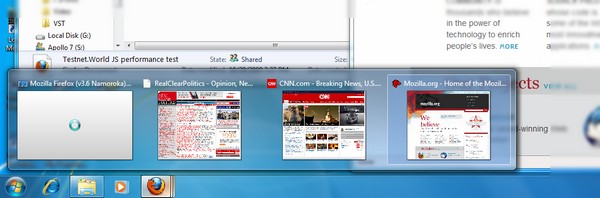
One of the nicest new features in Microsoft Windows 7 concerns the revised taskbar, specifically how many more choices are available to you when you right-click an icon, or when you just hover over it to see where all your open windows are. In Mozilla Firefox 3.6 Beta 1, which went live just minutes ago, the browser's integration with the Win7 taskbar is now on a par with that of Internet Explorer 8.
Specifically, the contents of the first handful of active tabs are transmitted live to the taskbar, meaning that the thumbnails contain live images of Firefox pages, including active video. In our initial tests just after we downloaded the final edition, we noticed a possible bug in this feature just with regard to Betanews.com, for reasons we're not certain of at the moment (maybe we scored Chrome too high last time). Our thumbnail doesn't show up yet. This isn't the only possible problem we've noticed today; the File Open dialog box seemed slow to sort entries when we called it up. Obviously this is a beta edition, so little problems like this could crop up, but now it's the public's responsibility to point them out.
If you're trying 3.6 Beta 1 out for the first time, and you don't notice the much-talked-about Ctrl+Tab feature working just yet...don't worry, you actually have to turn it on manually. It's an about:config setting called browser.ctrlTab.previews, which must be set to true. It's only the first 15 minutes or so, but this feature seems to work flawlessly at the moment: When your browser window is open, the same thumbnails that appear in the taskbar for that window, now appear here in a selection screen that'll be comfortable for Windows users who use Alt+Tab already to page between open windows. Just typing Ctrl+Tab still moves the active tab forward, like before. To get the menu feature to work, you have to hold down Ctrl alone for a moment first, then press Tab.
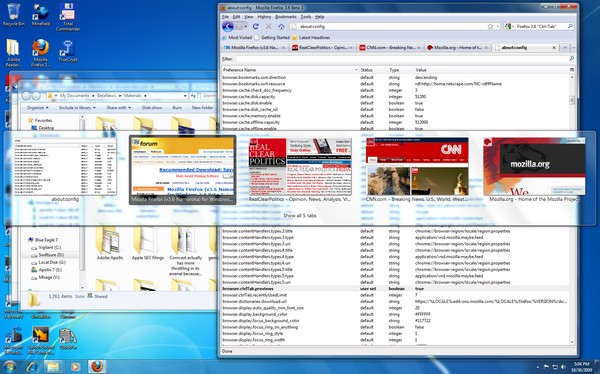
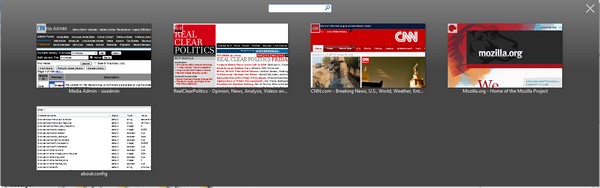
You keep pressing Tab until the highlight is over the page tab you want to open, then you release both keys. But there's another feature here that has "Aza Raskin" written all over it: When you highlight the button that says "Show all n tabs," Firefox brings up a Fennec-like menu of thumbnails. You can let go of your keys and still see them all. But there's also a search box that lets you narrow down the set of on-screen tabs to those whose titles contain the text you give it, in case you can't find a certain page based just on how it looks alone.
Previously, based on Betanews performance tests of nightly builds, we predicted that the first public Firefox 3.6 Beta 1 would have almost 23% better performance overall than the current stable 3.5 build. We're still tabulating figures at the moment, but in the early going, the performance gain on Windows 7 alone appears to be about 21% based on the scoring system we were using at the start of the month, but closer to just 10% using a revised scoring system we're premiering today. We'll have a full report later today when the final numbers are in.

![]()
2:05 pm EDT October 31, 2009 · The results are in, and they took a little longer than we expected because we wanted to verify a few extra points. (That and Firefox 3.6 Beta 1 came out later than we anticipated.) But here is the final breakdown:
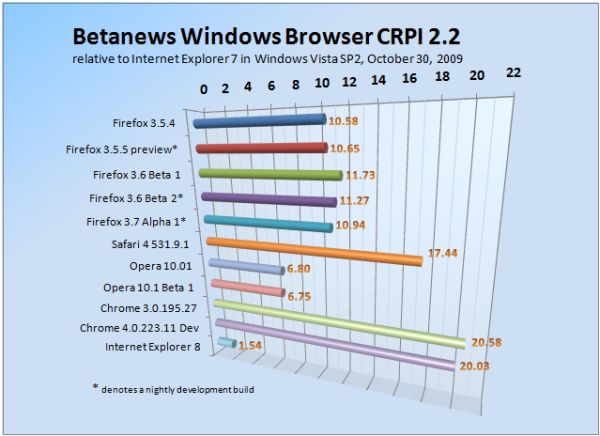
The new public beta 1 is Mozilla's best performing browser of the bunch -- more than its stable editions, and more than its private test editions. But with a few new tests added to our evaluation suite, the gap between 3.6 and 3.5 is actually not as much as we anticipated, although testers are reporting they can feel the speed bump.
A complete report on the latest round of tests appears here.

I'm waiting for Firefox 3.6 final before finally (hehe) switching camps from Maxthon. There are just too many goodies in FF these days for me to pass...
Score: 0
|Does it include the new default theme?
Score: 0
|http://www.promdressonsales.com/
asque Waist - Waistline dips below natural waist forming a 'V' in the center Dropped -
Waistline dips below natural waistline and sits more on hips Empire - High waistline just under
bust Princess Cut - Many wedding gowns, especially A-lines, have no defined waist Natural -
Waistline sits between the empire and dropped waistlines.
Score: -8
|Waiting for the benchmarks!
Score: 0
|As a reminder to XP users this feature everyone is raving about is only for Windows 7 and future releases because of the taskbar modifications MS made for thumbnail previews. Now what I don't know there are Windows 7 transformation packs that also provide the aero glass effect including the new taskbar could it be possible after modifying the browser setting would it be noticeable or would it be blocked?
Score: 2
|It is kinda possible , btw two superbar emulators programs are already there on web , sbar and viglance
Still the true functioning part wont be there , browser cant support those features on xp/vista but the program can...
Anyways , i feel that finally , xp is moving closer towards its glorious funeral. With windows 7 , most of the xp users are switching to 7 , and not only users but software giants are also dropping support for xp. And if we talk about netbooks , then 2gb ram netbooks with dual atom processors are out, so xp has no scope now.
8 year old regime is going to fall , but gloriously!
Score: 1
|"btw two superbar emulators programs are already there on web , sbar and viglance"
...and neither of them work under a new XP SP 3 install on one of our newer desktops at work. Sbar won't even run...
Score: 1
|"most of the xp users are switching to 7"
If only there was a way to substantiate that claim... no matter how much I wish it were true.
Score: 1
|they did work here
Score: 0
|at least 13 ppl in my locality switched to 7
Score: 0
|If you use Windows7, and IE8 you don't need an emulator. Did you see I got 6 thumbs up over on the other thread ? I'm goin' for a batch of thumbs down on this thread though. IE8 and Windows7 64bit rocks bro. Opera, Chrome, Firefox who needs 'em ? Not me that's for sure.
Score: 2
|@bogas04: did they have an upgrade party? :-D
Score: 0
|I noticed in my testing of the 64bit RC of Win7, the **32 bit** version of IE8 was used by default. I had to reset the shortcuts to use the 64 bit version.
Score: 0
|@ DrTeeth:
It's not just the 64-bit versions of Windows 7, but Vista and XP as well.
There's a reason why it defaults to the 32-bit version, same as with Windows Media Player: plug-in compatibility.
Adobe Flash, to name one.
http://kb2.adobe.com/cps/000/6b3af6c9.html
Unless you have no need whatsoever to view web content which requires a plug-in that doesn't exist (yet), there is not much sense in going out of your way to use the 64-bit version of Internet Explorer (yet).
Score: 0
|FYI Tool: I was able to get viglance to run on my XP SP3 box. Didn't try SBar yet.
Score: 0
|Yeah, I could get Viglance to run (hence why I singled out SBar as being unable to get running), but it didn't "work"....
So...
*shrug*
I'd rather actually use Windows 7 anyway so it's not like spent *any* time actually trying to get it to work. It didn't when I launched it and I gave up. Ah well.
Score: 0
|I bought a new laptop on the 10/22 with Win7 64bit home premium. That brings me up to 4 systems with Windows7, 2 with WinServer 2008, and 1 dual booting netbook (Win7/Ubuntu9.10).
The only system that I have to touch that has WinXP left on it is my work machine... viglance is kind of cool to have here, makes people give me weird looks ("You have Windows 7 installed?!"). :-)
Score: 0
|Meh... Instead of going that route, I installed Win7 on my Work PC and laptop.
Lucky me. :p
Score: 0
|why would you want to use a transformation pack anyhow? Seems that all those things do is bog your system down (plus they seem to be buggy as hell and not all your apps willk play nice with it - or vice versa). Yeah it looks nicer but then again it's making your OS look like something it ain't, and slowing it down in the process. if you want the new OS functionality just get the new OS.
Score: 0
|Believe me, if I could, I would upgrade this box to Win7... it drives me batty that I have a single machine that I have to remember all the XP crap for! ugh...
Score: 0
|Heh. Yeah. I was actually ecstatic when we decided my system would be one of the first using the RTM for testing.
So far....flawless. A few niggling things here and there (One of our in-house apps is naughty...using the registry in ways not intended...), but overall, a huge improvement.
Score: 0
|Agreed but I like to run multi browsers anyway. I do most of my browsing in IE8 these days, but FF still has better bahavior in the drop down favorite bar and inline spell check.
Score: 0
|The speed increase is definitely noticeable.
Score: 0
|(maybe we scored Chrome too high last time)
ROFL!
Score: 2
|Aero peek performance is really slow , most of the time i get that hourglass icon , and in the mini-previews the screenshots are not so tidy
anyways , firefox 3.6 beta 1 seems to be really fast , at least for me its enough :) I think there are two more major testing builds left (beta 2 and rc) so we can expect the final one to be at least faster than chrome 1. Hmm , better
Score: 0
|Well, it works. Only problem I have is the thumbnails will be blank, and when I highlight them it loses the entire firefox window. Least I can see the titles of tabs from the taskbar tho. Love that.
Score: 0
|Installed and seems to work well. time will tell.
Score: 0
|Betanews has bugs?! When I add software to my ignore list, in Firefox it completely hangs up the browser for 30 seconds. In Chrome I must close the popup window before I can add another to the ignore list.
Score: 0
|Buy A Prom Dress to Fit Your Body Style!
http://www.promdressonsales.com/
http://www.weddingdressart.com/
Score: -7
|Blunt force trauma would look good on you, spammer.
Score: 0
|prom dresses? those things only stay on for a few hours before coming off :)
Score: 0
|

