
Concept video from Mozilla Labs gets developers thinking, talking

A typical developer may often leave a major developers' conference thinking that most everything relating to how a graphical operating system works, has already been invented. But a new video from Mozilla Labs blows away that illusion.
A new set of conceptual videos produced by Mozilla Labs engineer and user experience chief Aza Raskin -- the son of the late, legendary Apple Macintosh and Xerox PARC user interface designer Jef Raskin -- offers some completely new ideas for how a Web browser, ostensibly a future version of Firefox for mobile, would work on touch-capable handsets.
But in so doing, Raskin has actually opened the door for some bold rethinking of the entire nature of Web "browsing" -- if it should still be called that -- on all platforms.
Raskin envisons an environment where Web pages -- the things that Mozilla currently says are displayed in "tabs" -- are actually elements resting on a zoomable desktop he calls the infinite 2D plane. The meaning of "tab" changes in this environment, becoming more like a document the way his father often envisioned, except the document is represented not by an icon or a little graphical tab...but by a document, just zoomed down.
Once the document is zoomed into view, all the control and functionality features relating to the document (toolbars, menus, things a mobile user may want to do with one touch) reside along the top and bottom edges. But this isn't a window, and the page doesn't scroll "beneath" a region framed by these functional elements that stay rigid. Rather, the address bar and navigation features scroll away when the user drags the page down, and the functionality features (for instance, a place to embed "Digg This!") crop up along the bottom once the user has scrolled to the bottom of the page.
That way, when the user is reading the Web page, there's nothing on the screen but the page itself. The trick is to make the system as functional and sensible as it was before, without much extra bother on the user's part, while reducing or even eliminating screen clutter.
|
| A screenshot of an open document appearing in Aza Raskin's 'infinite 2D plane,' a conceptually new environment for Firefox on mobile devices. |
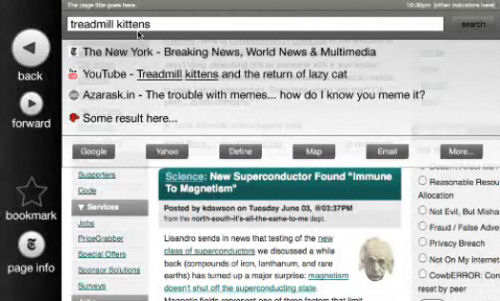
Scrolling up and down is an obvious process for a mobile user with a single-touch screen, but what about zooming out? Do we need a separate key for that? Raskin's goal was to put all the functionality in the environment, leaving nothing to the outside. So he created a concept called "throwing" the page, which takes place when you zoom left or right beyond the document margins. The user sees an arrow marked "zoom out." Touching this region throws the document back onto the desktop 2D plane; and this enables a kind of half-circle wiping gesture that makes the throw take place in a split second.
A slight exception occurs for throwing to the left, because tucked away outside the left margin of the open page is a functions bar for items such as "Back," "Forward," and bookmarking. Accessing this bar is a matter of throwing "gently," while zooming out requires throwing more briskly. The distinction between the two, in practice, may be difficult for some to explain or master.
Another design element worth questioning is, why rely on a single-touch system? Why not think toward a multi-touch design, like what's currently available on the Apple iPhone and what Microsoft's experimenting with in its Surface laboratories?
As Raskin wrote in an explanation alongside his video, "Why not multitouch? Because Firefox should be able to run on the least common denominator of touch devices. Especially for touch-enabled interfaces direct manipulation is key. Along that line of thought, the interface should be operable with a finger. Switching between input methods is time-consuming and annoying, so the user shouldn't have to switch to a stylus or other secondary form of input."
Though the source code for Raskin's project is publicly available, he didn't waste any time during his video or within the accompanying explanation, talking about platforms or operating systems or specific SDKs. In keeping with the work of his father, his demonstration was more direct, concentrating first on what could be done before addressing the obstacles of why it can or cannot.
Raskin's business line of work is as president of the software design consultancy Humanized. His services as "user experience lead" at Mozilla were first retained last January, along with two of his Humanized colleagues.



