Microsoft's free Security Essentials anti-virus tool goes live
By Scott M. Fulton, III | Published September 29, 2009, 3:13 PM
Free anti-virus protection for Windows, in one form or another, has been available for quite some time. In fact, these days it's been used as the virtual equivalent of the retail "doorbuster," enabling security companies to plant their brands on users' systems. It's a strategy pioneered by Ad-Aware and ZoneAlarm (now part of Check Point Systems).
But Microsoft -- at least ostensibly -- is not a security company, and becoming recognized as a security provider at this stage of its history would actually be more difficult than for most other software producers. Still the company has gone forward just hours ago with the live distribution of Security Essentials, its free and basic anti-virus system for Windows.
Although Microsoft does produce an enterprise-class security package, Security Essentials -- while incorporating part of Forefront's detection engine -- is not a stepped-down version of Forefront, or a "good" or "better" option to Forefront's "best." So Microsoft's intentions with Security Essentials are clearly not to make room for itself as a consumer security provider.
Instead, Security Essentials could change the market in two ways: First, it could moderate the impact of security software companies that draw attention to Windows vulnerabilities by scrimmaging over every major and not-so-major threat that comes along. Second, SE could improve Microsoft's reputation for being responsible for the seaworthiness of its own principal product.
Both of these effects on the market could contribute toward one very important end goal: avoiding the characterization among consumers of Windows Vista -- technically a much more secure operating system than Windows XP -- as relatively insecure. Other than its fortress icon, Security Essentials stays very much in the background. And in Betanews' experiences with the SE beta over the past two months, its impact on our everyday work in Windows 7 RTM was not noticeable, and quite possibly not even measurable.
FOR MORE:
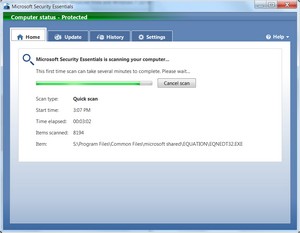
"Not noticeable" appears to be Microsoft's goal with Security Essentials; while other free packages are designed to be in-your-face to some extent (case in point, using system tray icons to report from time to time, "Your system is being protected!") it seems Microsoft would be happy if SE's users actually forget it's there. In paragraph 2 of the company's statement on SE this morning, consumer security general manager Amy Barzdukas summed up SE's key virtue with the following few words: "It won't get in their way."
As an experiment, we ran several batteries of Web browser performance tests in Windows 7, once with Security Essentials turned on, and once with it disengaged and removed from memory. Performance times for major Web browsers, including Internet Explorer 8 and Mozilla Firefox, were sometimes equal; and in the SunSpider test, browsers were slightly faster with SE turned on.
The reason, we suspect, may have to do with the quad-core processor of our physical test system (Intel Core 2 Quad Q6600). SE does appear to use parallelism quite well; on our CPU usage meters, while ordinary processes tend to favor Core 1, during system scans, SE tends to start with Core 1 and then shift over to Cores 3 and 4. Third-party antivirus packages we've seen are not nearly as adept with parallelism; even Sophos (one of my personal favorites) generates a measurable, if negligible, performance hit on Windows 7.
Microsoft has begun playing down, however, what it had touted as SE's key feature early in the beta process: a system called Dynamic Signature Service (DSS) of detecting and sharing threat assessments in real-time with a network of other security providers. DSS is still being portrayed as central to its Forefront commercial product; but Microsoft may have decided that, in the best interests of its goal to not get in anybody's way, it may be better to turn down the volume on the message that 20 or more partners are looking into all the anomalies your system may be reporting.
Security Essentials can co-exist on some Windows users' systems with Microsoft Defender, which is being re-cast as an anti-spyware program in the vein of Ad-Aware. Some users will, no doubt, be confused by the fact that SE frequently needs definition updates for itself (and can update itself), while Defender still alerts Vista and Win7 users in the background through Windows Update (when it's set to explicitly notify prior to updating). That, ironically, may be the most frequent occurrence of SE getting in users' faces. Until then, Microsoft is hoping that customers who've had enough about being reminded of potential insecurities, may be willing to spend a few moments of their time to invest in a new flavor of security tool: fire-and-forget.
so is defender useless now? what happend to onecare?
Score: 0
|OneCare is gone, and Defender is still around (still available for download) but not sure why.
Score: -1
|Defender is useless in my tests. Misses a *lot* of malware.
Score: -1
|I think this article should have been the featured one, not the confusing and less informative Q&A story that Wilcox wrote... No offense to Wilcox.
Score: 4
|I have been visiting betanews for several years now, and this day is a little bit special. I find folk actually singing the praises of a Windows product, long time enemies have become friends, people are actually thanking each other, and the Opera gang have for once not been giving my comments a thumbs down. This bit of software has brought about something few of us could have dreamed of, a feeling of calm has enveloped the forum, thank you Bill, thank you Microsoft.
Score: 1
|You've had too much to drink. Put. The Bottle. Down. ;)
Score: 1
|I have been running this since the beta. I started out with it running beside Avast. Then after I was satisfied Avast got the boot. This program is rock solid and caught some stuff that Avast missed.
Score: 1
|Uninstalled my AVG Free and started using MSE when the beta came out, have not looked back once. Its quiet, does a great job detecting marlware/spyware/viruses and uses a fraction of memory footprint of the other bloat AV's.
Score: 1
|Score: -6
|Truer words have never been spoken.
Score: -2
|In a matter of a couple weeks, Avast.com will release Avast 5, it's faster, smaller and more powerful than ever. It's even going to include for the first time a firewall built in. I've been testing beta 2 and very impressed. Now in all fairness I did test MSE, it was good but a bit too aggressive for some of my apps and programs. However Kudos for Microsoft to release a not soo buggy product and freely for public use away from the traditional payment plans.
Score: -2
|Have they removed the idiotic 'media player' paradigm? That is really a turn off for me, and, I would think, for many that take security seriously.
Score: -4
|guru, if Advil 2.0 looks and tastes like a gummy bear, you're going to write it off despite the fact that it works, and works well?...better than the previous Advil types that have been on the market?
That's...well...idiotic.
Score: -2
|" It's even going to include for the first time a firewall built in"
Well that is something we need, another 3rd party firewall screwing with the system at levels that are not needed.
The built in Firewall of Vista and Win7 are fairly advanced, and do in and out control all the way to the application layer, which is covering the upper levels of the OSI model which is something most 3rd party firewalls don't do.
Additionally, when you have an optimized network stack with and integrated Firewall in the OS, and replace or insert 3rd party code into the network stack to handle traffic, you are going to lose performance at the very least and most of the time, create compatibility issues.
For all the IT people here that have had to deal with McAfee or Norton's firewall or network layers preventing users from sending email or visiting certain web sites because they are using something beyond the stardard http ports it becomes a freaking nightmare.
If you are in the IT world, rule #1, have the user diable the 3rd party networking security/firewall.
Most of the time the users that have these products don't even realize it is injected itself into the network stack and then complain when application XYZ can't do something on the internet. And we certainly don't need another brand doing the same crap that has earned McAfee and Symantec a bloated crapware status that their 'messing' with the OS has become.
On a new Vista install compared to a Vista install with any McAfee or Symantec the performance is visibly noticeable. This is the main thing that when users complain of 'bloatware' installed on OEM computers, it is essential the Anti-Virus software that has injected itself into the network stack, and even the I/O processes.
And on Vista, it was freaking horrible, just the other day another new computer of a customer running Vista x64, and the difference from how the machine arrived to rippingo off Norton their response was, "OH MY GOD, Vista really is fast with that crap gone."
I know the OEM kickbacks are good money for putting this crap on computers, but when it is easily consuming 25% of the performance of the computer and making their hardware look slow and also helping purport the myth that Vista is slow is doing a major disservice to their own customers.
So I'm really sad to see Avast adding in a Firewall and further reducing performance of a system when there is no added features they can 'truly' offer a user.
If the built-in OSI level Firewall in Vista or Win7 isn't 'secure' enough then you need to be using an external hardware firewall device protecting your entire network, becuase as for OS and Software level Firewall technology, you can't do much better than the included Firewall in Vista or Win7 on the new network stack.
Score: 1
|There are good firewalls which consume less resources than the Vista/7 integrated ones. And the problem with built in windows firewalls is that they do not filter outgoing connections, and that is a MUST for any advanced user...
In fact, that is my only need in a application firewall behind a router. I WANT to see which application is trying to phone home.
Pctools firewall (forget about the name) is a great product, light and does what I need, for free.
The problem about some 3rd party firewalls how are developed. Norton is... how to tell... s*** is the lighter adjective that comes to mind. Mcafee the same... Symantec integrated once good sygate engine, but already contaminated with Endpoint protection crap, shame... Sygate used to be great (still is if you use WinXP). Bought and destroyed...
I think companies using Microsoft tools to develop destroy good tools. Among them you have most notably Symantec and Autodesk.
Score: 0
|I took out zonealarm firewall/antivirus that I purchased for this. I really like this, seems to work well. I now evern decided to use windows vista firewall instead of installing another. All seems ok. I think (my opinion only) that this is one of the best ideas Microsoft has had in a long time. You do not even notice this working in the background and I have seen no slowdown or anything, remarkable, well done Microsoft.
Now we all hope it is as secure as we are told it is???
Score: 2
|As I told MS in beta, I think the program is *too* "not in your face"... I like how avast! and other AV programs give at least minimal notification that they're updating and working. Still, it is a nice safe-fall for basic users.
Lawsuit about MS monopolizing in 3... 2... 1...
Score: 1
|I like the fact that is not in your face. You set and forget it. Ronco would be proud!
Score: 2
|Nice thing about being a GOOD monopoly, is, that just like back in '98, if you've got 90% approval rating by your own "poor, oppressed and severely abused" users, then the lawsuit is bound to effectively get tossed immediately to a place of recycling where it may soon reincarnate itself as its born destiny -- T.P. FOR MY B.H. hehehehe
In all seriousness -- ph*** the software security companies. If they can't charge $20/yr for something vastly superior to justify SOME users paying the price, as far as I'm concerned (and most ppl) they can go flip burgers for a living instead...
Score: -5
|hmmmmmmmmm ..... what?
Score: 0
|@mjm
Security Essentials creates a restore point, so if anything was removed, restore your computer to the restore point it created, no need to dig through backups. (Also you can open 'Previous Versions' if you know the folder/file that was deleted.)
@Sturgess
Defender is not needed and turned off. Security Essentials does the work of Defender in addtion to other malware checking abilities, it even still uses the Defender definitions from Windows Update.
Score: 4
|My install replaced Defender.
Score: 0
|Right you are. So the process is to change the default action in SE to quarantine, turn off real-time, system restore, reboot, get the file to examine, change the default action back, turn on real-time.
One would think a rename of the file/type and store in directory up to x amount of data would be good enough.
Score: 0
|Mine did not. Defender is still there. System - laptop 1.5 GHz Celeron M Windows XP SP3 - fully updated.
Score: -1
|AnthonySPT "Defender is not needed and turned off."
Thanks.
Score: -1
|guru_v " Defender is still there."
Mine too. But I understand from a couple who have posted here that it is disabled, or will be at the next scan.
Score: -1
|What you're saying isn't logical. If immediately after installing the software you change default action to quarantine, why would you still need to perform the other steps you mentioned for EVERY false-positive?
My logic, without ever trying the software, which due to my extreme genius normally defies all actual experience by actual experts in their own field, says that you DO NOT. ;)
Of course if you meant that you have to go through those steps only once, then I hereby proclaim that Microsoft is permitted to protect its dumb-arse users from themselves by requiring said steps in order to prevent some curious p*ssycat from stumbling upon some file using some desktop search utility and renaming "hot sex not a virus!!.exe.virus" to "hot sex not a virus!!.exe" due to his vastly inferior & limited mental capacity. ;)
Score: 0
|"So the process is to change the default action in SE to quarantine, turn off real-time, system restore, reboot, get the file to examine, change the default action back, turn on real-time."
Cut out everything *after* "change the default action to quarantine" and you nailed it.
It should be the default. Hadn't even noticed that tidbit.
The rest of your post pertains only to what you need to do on your system because it *wasn't* the default action. If you do that first, the rest is unnecessary.
Score: -2
|Of course changing the default action to quarantine is the users' fault. How dare I even question leaving the product as-is and follow Microsoft's recommendations.
And I know this because you all came into this thread saying "Please change the default action to quarantine before you run the initial scan."
Oh, wait, none of you said this. The product doesn't even explain what default action it will take on its initial scan.
Hilarious. betanews readers know everything, and they knew it BEFORE you did, of course.
Let's not blame MS for the bad default action, let's blame the user for not changing the default.
Score: -1
|Open the program: Click the Settings tab. Oh, look...default actions is #2 on the list.
It's tough, I know...
Need an explanation of what the default actions are? It depends on the severity of what it believes it has found. There's actually a link to just that right on the settings page for default actions. Fancy that...
Severe to High: Remove.
Medium: User input.
Low: User input.
Makes sense except for rare instances when a false positive is labeled as "severe" or "high", such as your case.
I assume they weighed the "risk" vs "system restore" procedure required for a false positive and determined that the risk of a false positive (based on previous testing of the forefront engine) was minimal when compared to the risk of letting the user click "cancel" or "allow" out of habit.
Is it perfect for everyone? No. Nothing ever is.
Score: -2
|And, oh look...
The default actions for Severe, High, Medium, and Low alert levels are "Recommended Action". There is also the choice of "Remove" or "Quarantine"... but the default is "Recommended Action", which the program itself makes no attempt elaborating on. In other words: What the hell *is* the recommended action?
Sure, there's a link in the applications that redirects to Microsoft's site for more information:
=Recommended Actions=
So what are recommended actions? When you select Microsoft Security Essentials' recommended action, this means that you want Microsoft Security Essentials to decide how to handle this alert level. Here's how the program handles alerts, depending on their level:
* Severe or high level alerts : If Microsoft Security Essentials alerts you about potential threats that are severe or high, the recommended action is to remove these programs.
* Medium level alerts : For medium alerts, you should review the alert details (click the Show details link) to see why Microsoft Security Essentials detected the item. If you don't like what the software does or if you don't recognize and trust the publisher, consider blocking or removing the software.
* Low level alerts : This type of alert typically indicates a benign program, unless the program was installed without your knowledge or consent. If you're not sure whether to allow the software, review the alert details, or check to see if you recognize and trust the software publisher.
...but I think that information could easily be summarized in the application without needing to rely on an external source to figure out what in the world it's doing to *my* files. =)
Score: 0
|Thanks for this informative and good article Scott!
Score: 3
|I dumped AVG for this, and I'm liking it.Wondering if I should still be running Windows defender ? Anyone know ?
Score: 3
|It turns Windows Defender off after the initial definitions update and quick scan.
Score: 3
|teohhanhui "It turns Windows Defender off after the initial definitions update and quick scan."
Thanks.
Score: 0
|Yeah. Not sure where Scott sees them running in parallel.
*shrug*
Score: -1
|I just decided to ditch AVG Free to give this a shot temporarily. So far it seems very efficient and lightweight. It's not complicated and doesn't feel intrusive either. I'm sure with a bit of marketing, this will be a hit.
Score: -1
|Had a false positive on an ini file. It took the default action (delete,) with no way to restore the file other than backup restore.
Score: 0
|Ouch. Thanks for the warning. Hopefully there is an option that will allow the auto delete to be "ask before deleting" to solve that problem. Otherwise, seems like a step in a good direction in terms of footprint, performance, and security. I will give it a try on a test machine and report any issues found myself.
Score: -1
|its smart with any antivirus to disable automatic actions, common sense... because of false positives
im giving MSE a go, i like it so far
out the door you go avast!
Score: 1
|I hate it when this happens, but this very same thing happened to me the other day with zonealarm antivirus. It happens, so it makes sense to check settings and make sure they are what you want. Do not blame the softrware, but do report the false positive to Microsoft so they can have a chance to correct it. But as I said, this will happen with any security software like this.
Score: 4
|