Login:
Password:

Microsoft's Search 4.0 for desktops emerges from beta

By Scott M. Fulton, III, BetaNews

June 4, 2008, 6:12 PM

No, it's not WinFS, the file system that was supposed to revolutionize the way files and documents are stored in Windows. But if it gives users tools that accomplish the same things WinFS was supposed to provide, does Search 4.0 come close?


Download Windows Search 4.0 for Windows XP and Windows Server 2003 from FileForum now.

After making a preview release available last March, Microsoft this morning lifted the curtains on its completed Windows Search 4.0 desktop tool.

In a post on the Windows Experience blog this morning, developer evangelist Brandon LeBlanc touted today's release as a milestone, saying, "First and foremost: We've introduced some performance and reliability improvements. Queries are faster, as is indexing -- how much faster depends on your machine and your data. Improved reliability means that system failures won't get in the way of the indexer and all of your data will be scanned and available for searches."

BetaNews installed the new 4.0 edition on a virtual Windows XP SP3 system that has Office 2007 installed. Granted, that's not a system with a lot of contained documents, but it's a fair initial test of operability. We didn't have to reboot the system to see the results: In a few moments, what Microsoft is now calling the deskbar shows up next to the system tray.

One thing we were surprised to find almost immediately: While the Search Web button from the desktop popup still submits the query in the text box to the Web browser, it happily accepts whatever the default search engine in that browser may be. We used the same test system where we installed Firefox 3.0 RC2 this morning. It's the default browser on that system, and our default search engine is Google. Thus, Microsoft's deskbar actually became a launching point for a Google query.
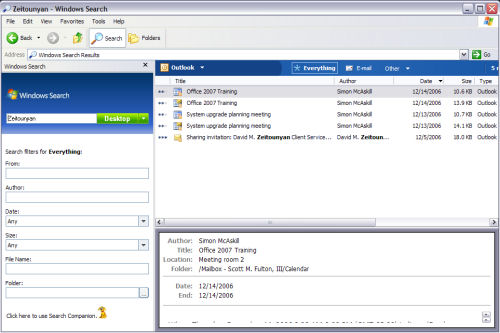
The slightly revised search screen from the new Windows Search 4.0 (nee 'Desktop')

The fact that Search 4.0 enables indexing across PCs means we could safely generate an index of folders on our test network, on a virtual system that wouldn't negatively impact the production systems on that network.

We discovered that Search 4.0 on our test system would only index the contents of the local Documents and Settings folder (obviously this is Windows XP) by default; all other locations, both local and networked, should be entered manually. Certainly, one of the methods we use in beta testing is officially called "stumble-and-discover." It's an effective method of learning how a program responds when it's run by someone who hasn't followed the directions...and we're often very good at that.

So in our initial tests, even though Search 4.0 said it had indexed other locations on our network, we learned that it really hadn't. The reason, of course, is that Search 4.0 must be installed on all the systems that are to be involved in a PC-to-PC search. This is because all indexes are local, and Search 4.0 executes remote searches by polling remote indexes.
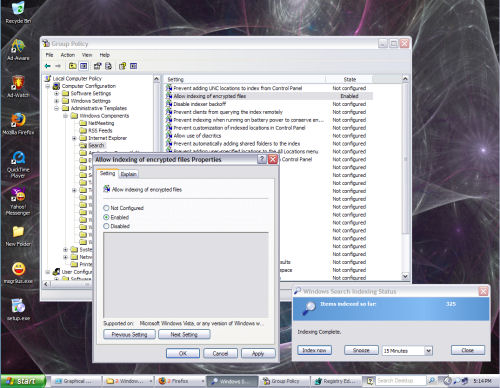
Group policy editing in the new Windows Search 4.0

Another feature we'd read about is the ability for local search settings and privileges to be managed using Group Policy. Local group policies are editable using the Microsoft Management Console -- run gpedit.msc from the command line or from the Run dialog box. After you've installed Search 4.0, you'll find a set of administrative templates for Search 4.0 in the Windows Search tier, under Administrative Templates.

What's beneficial about group policy settings is that they're typically in English (or sometimes whatever your native language happens to be), and you can instantly make sense of what capabilities are turned on or off. Here, we've turned on indexing of EPS encrypted files (a new feature for Search 4.0); other examples include turning on or off indexing of Outlook and non-cached Exchange e-mail repositories.

It takes more than a few minutes of time with this service to render a good opinion on whether Windows Search 4.0 is an improvement over its predecessor. So it's not good news for Microsoft that some BetaNews members who spent some time with the product today, don't have much good to say about it yet.

"The interface for search doesn't work well with the taskbar," wrote BetaNews member mjm01010101. Typing text and having it not find anything after pressing enter brings up strange error messages. If you have a vertical taskbar, you are screwed. When I searched it ignored my Outlook e-mail, could find nothing. I looked through the config perhaps I'm missing something, it claims to have indexed everything."

In our tests, we noticed it was easy to leave the setting on the blue filter bar to "Files," in which case, it didn't appear as though any Outlook e-mail was indexed. The moment we changed that filter setting to Outlook, e-mails in our test setup appeared immediately.

Earlier versions of Windows Desktop Search (as it used to be called) were tragically slow, so this version has plenty of opportunity for improvement.

Add a Comment (12 Comments)

BetaNews reserves the right to remove any comment at any time for any reason. Please keep your responses appropriate and on topic. Foul language and personal attacks will not be tolerated.

Name (required):

E-mail (required):

Enter Your Comment:

By ZenWarrior

posted Jun 5, 2008 - 1:21 PM

Over my career, I've had to adapt to many different OSs--from Mac to mainframe. None aggravated me as much as Vista is doing right now. And in fact, I always welcomed the changes and opportunities to learn something new.

However, I apparently made the mistake of finally taking the leap and bought a PC with Vista. I sold my XP machine. I now see both decisions were huge mistakes.

Vista may be working just fine for many others, but I've already found sufficient issues to have me greatly regret giving up XP.

I don't hate Microsoft, but I do hate a firm which passes off something like Vista to consumers as an improved product over the previous offering (i.e., XP). My life is more difficult now and only b/c I decided to adopt Vista. Thanks, Microsoft.

Score: 0

By xyzcb1

posted Jun 5, 2008 - 3:02 PM

Over your career? You didn't save enough to get a copy of XP and instead of your new computer?

Stop whining and do something.

I use XP as main and Vista over VM Ware. Only reason I haven't move to Vista is lack of 64 bits software. I know 64 bits will not get there until MS drop the ball on the 32 bits system.

Score: 0

By Tenoq

posted Jun 5, 2008 - 12:13 AM

Search 4.0 was the only way I could fix Vista's built-in search function. God knows what broke it (I put it down to just another random Vista issue) but despite working through literally dozens of fixes, installing the 4.0 Preview was the ONLY way to get my Start search functioning again.

So I guess the program has the thumbs-up from me, even if it's just technically a patch for the broken one that shipped with Vista SP1.

Score: 0

By Yakumo

edited Jun 4, 2008 - 9:06 PM

Avafind is a security risk on vista, either your happy with it not finding any files your use account doesn't have permission for which includes the windows dir even if your an administrator if UAC is on. Or you elevate it but then any executable that you run via Avafind also runs elevated with no warning.
Also it hasn't been updated in many years sadly.

Locate32 is free, very fast, and indexes everything, the only thing it lacks is updating the database from system I/O operations.

MS Live search 4 is worth installing on vista, and configuring to not be used for most of your system, simply to speed up the search of the start menu. (that is if you aren't interested in the contents of your files being indexed, I only need to search via file name, so love locate32)

Score: 0

By hardgiant

edited Jun 4, 2008 - 6:24 PM

I'm really disappointed in Search, it's slow, buggy and difficult to configure. I can't imagine how Microsoft allowed something so poorly designed to bare it's name but then Vista wasn't great to begin with.

I disabled Vista Search and use Avafind for files and Xobni in Outlook 2007.

Score: 0

By AnthonySPT

posted Jun 4, 2008 - 9:02 PM

----
I'm really disappointed in Search, it's slow, buggy and difficult to configure
----

Slow?: It is the fastest Desktop search tool by far, especially on Vista, as it uses the new I/O model in Vista even hardcore indexing has little to no performance impact in the background. (No other Search tool utilizes these features in Vista)

Buggy?: There are very few if any serious or known bugs. Especially compared to other solutions. OS X or Google Desktop Search being the most obvious comparisons. OS X being the worst of the examples even for bugs and performance issues.

Difficult?: It is enabled by default on Vista, and just work, how is this difficult?

Features: It is also the most full featured Desktop Searching design on the market. Sure Google and others will do basic indexing, but when you compare features nothing comes Close.

Go search for Start++, it is a tool that uses uses Vista Search in the Start Menu, and showcases just a hint of the power of the Vista search abilities.

Let's review a few features other products do not have or do well:

It has full user SQL parser and even ODBC SQL abilities. Did you know you can literally do a query in Excel and have it return results of Documents on your Computer?

It inherently handles Ink, and Images, and even Voice for indexing. Meaning OCR of Images for textual indexing, and as used in OneNote you can search for a recorded word, and the searcher even provides context linking back to Onenote of the place in the audio file.

Networking search is built in, and works locally or remotely. This means your index can maintain the index on another computer, or the Server or peer computers have search installed (like Windows 2008) it will just ask the server or peer computer for the results, so it don't have to maintain any of the index locally. In a corporate world, this is freaking awesome to be able get results from a Server holding Millions of documents in a fraction of a second.

And the list could go on and on, from natural language to LINQ, to handling data stores like an Outlook PST file or any data store. (Not requiring file level entries like OS X does.)

4.0 of Search (having been in the beta) adds improved performance (especially for XP users) and additional features for Exchange and business users. It is not an essential upgrade for Vista users, but does add a few optimization and features that may be worth the download.

As for Desktop Search or Vista Search sucking, people need to take a breath once in a while. Vista is not the 'pig' of headlines people are still trying to convey it as.

Vista in current reviews is faster than XP in gaming, faster than XP in business applications, and is faster than XP in graphics & Video applications, and is faster than OS X in all of these areas as well. (Run bootcamp with Vista on 10.5 and do the numbers yourself.)

Here are the rules, if you have 1gb of RAM, Vista is faster. If you have a Geforce 5200 card from 2004 or newer, Vista is significantly faster due to the GPU based optimizations.

(Yes even WDDM shoves some GDI/GDI+ features through the 3D GPU, in addition to bitmap decompression and font drawing, so even with the 'pretty' glass, Aero is faster than turning it off and is also faster than XP.)

The Vista Myths and FUD needs to stop at some point. There are over 100 million Vista users, and very few have any problems. It is either the OS Fanbois that hate MS or people that didn't want to learn the UI differences that are the biggest whiners on the Internet, and they make up less than 0.01% of the actual Vista users. PERIOD.

Score: 0

By guru_v

edited Jun 5, 2008 - 11:39 AM

[Vista in current reviews is faster than XP in gaming, faster than XP in business applications, and is faster than XP in graphics & Video applications]

Cite one example, other than Ed Bott's flawed results, which were refuted by co-worker at ZDnet, A Kingsley-Hughes. I have begun to think there are way too many paid shills for Microsoft, so that they can pump up the Vista rep - people like you are the ones spreading misinformation, and FUD.

My results go somewhat like this - Vista might come close to XP speed, if you have a GeForce 6800XT or better, and 4GB RAM. This is what has been observed by me as I work on many machines, and I'll grant that Vista is less a pig than before, but not close to XP speed - if you read the design ideas, it isn't supposed to be. MS decided they could get parity in speed because they assumed that users would be getting a machine at least 50% faster than the ones that were running XP, so externals were counted upon for speed, not great coding.

Score: 0

By mjm01010101

posted Jun 4, 2008 - 10:00 PM

I know it is anecdotal, but people I talk to at work are pretty disappointed with Vista. Nobody asks for it on their work machine.

There is one programmer dude at work who likes it, has never had issues with it, so I'm not saying it is universal.

I have tolerated vista since SP1. Before that it was a beta OS.

Score: 0

By Metshrine

posted Jun 4, 2008 - 11:54 PM

Its funny how that BETA os worked just fine for me since its release

Score: 0

By Tenoq

edited Jun 5, 2008 - 12:15 AM

Vista either works or it doesn't. Some people are lucky enough to have a perfectly fine Vista machine. Others have NO END of trouble. It just seems like pot-luck - which in the end, really IS a problem for Vista. It's just not reliable, because you never know if you're going to be in the "I love Vista, it's been 100% perfect on my machine" or the "Vista sucks, it never works" categories.

Don't just assume because Vista works on your machine it should be fine for everyone. I'm sick to death of that lame argument.

Score: 0

By testman

posted Jun 5, 2008 - 4:58 AM

Yeah but you could equally attribute the same comment to XP Or any other version of Windows. So at the end of the day, just complaining about Vista and making it out ONLY Vista has a problem is simply speading FUD.

Score: 0

By guru_v

posted Jun 4, 2008 - 7:25 PM

This may not be kosher, but why avafind? I went there and am wondering what makes it worth $20/yr. I'm up for a one time fee, but per year sucks. How does this compare to Copernic or X1?

Score: 0

