Netscape Browser 8.0 Beta Goes Live
By Nate Mook | Published March 3, 2005, 12:16 PM
America Online's Netscape team has opened its doors to the public, releasing the first beta of the revived Netscape Web browser. Based upon Firefox, Netscape version 8 focuses on security and protecting user privacy, and supports rendering with both Mozilla's Gecko and Microsoft's Internet Explorer browser engines.
As reported by BetaNews, AOL originally planned for a February beta, but pushed back the release to March citing the need for more time. The company has been polishing the numerous changes and enhancements that were added since the prototype of Netscape 8 last November.
One Netscape developer told BetaNews, "The prototype and beta are completely different applications, practically."
In January, a minor update to Netscape brought the browser's code base up to Firefox 1.0. AOL did not have time to incorporate Firefox's recent 1.0.1 changes into the beta release, and acknowledges, "The deficiencies noted in Firefox 1.0 are inherited in Netscape 8 Beta in most cases."
A source close to development told BetaNews Netscape 8 will be upgraded to Firefox 1.0.1 before the final release. The source also noted that because most of the phishing sites with Internationalized Domain Names are blocked through blacklists, the Firefox vulnerabilities are not as relevant to Netscape 8.
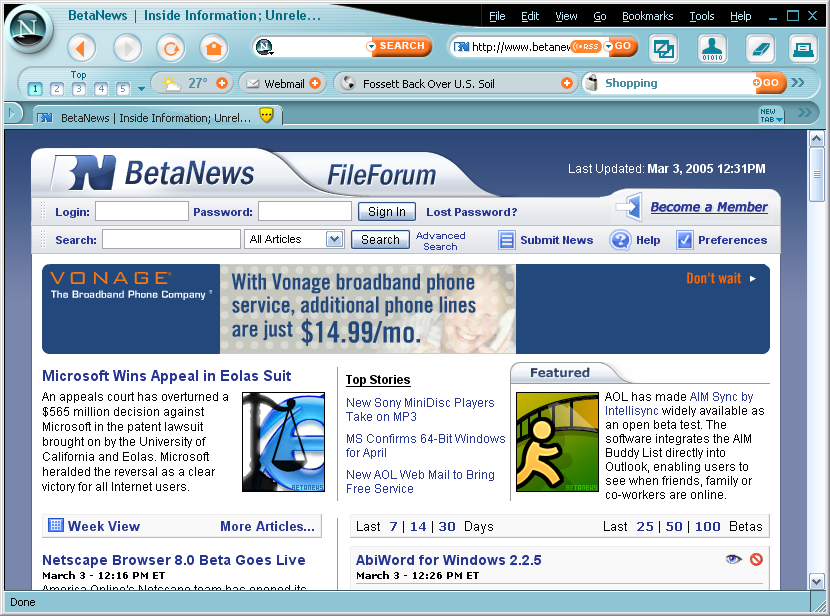
In addition to changes under the hood, AOL's Netscape team has made numerous modifications to the browser's outside. A new skin has been developed for the beta, along with other usability improvements.
To reduce browser clutter, Netscape has included a "Multibar" feature that combines up to 10 customizable toolbars into single buttons. Users can create their own toolbars with RSS feeds, or use the included toolbars that feature content from AOL's media properties.
Designed to protect Web surfers from scams and viruses, a new "Trust Rating" system helps to warn users of potentially dangerous sites. AOL says it "continuously updates the browser with a list of trusted and suspected sites" and "will automatically apply your security settings to make you safer and more compatible."
If Netscape 8 encounters a blacklisted site, it will first display a page warning the user. Blacklisted URLs include phishing, spyware and virus laden sites.
"Sites that are neither whitelisted nor blacklisted (the majority of sites on the Web) will render in Firefox with cookies, Java, etc. activated -- but ActiveX off -- for maximum security. If a page doesn't render or work properly, the user can flip it to IE with a single click," a source said.
Netscape Browser 8.0 Beta is available for download from FileForum.

I've been really pleased with this browser, I like the look and the useability is easy and intuitive. This is probaly THE most secure browser out, since it can detect phishing sites. The toolbars are very customizable and the live news feeds and weather is a neat touch. This is a GREAT browser especially for a beta, hopefully a future version will allow you to add different search engines on the toolbar. If you don't want to use any IE at all this browser easily allows you to browse only in the Gecko engine. I'm done with IE for good...unless I absolutely need to use it, which this browser allows me to do. This is now my default browser.
Score: 0
Hmmm... I downloaded it and it seemed allright at first... Even had a neat little feature to log me in to my GMail account automatically... Then it froze. And It's still frozen. I don't really feel like restarting my computer, so here I am stuck with Netscape 8 beta running and taking up memory but not doing anything. If I were you, I would only download the Beta if I had a lot of patience. Looks great, some cool features, but unstable. I'll be sure to download it right away when it comes out of beta, as I like the features but not the unstablility. Meanwhile, I'll wish for a cross between Opera and Firefox (open source, *fully* custumizable, free, and fast.) The only reason I'm not using Opera 24/7 is because of the Ads (I really don't have $30 to shell out for a browser).
EDIT:
I've been surfing for about 1 hour on NS8 and so far it has been looking a little bit better than when I first saw it. I think it could become a useful tool for website designers who wish to ensure cross-browser capability without having several windows open.
I discovered that you can remove the piece of crap "personal toolbar" that has weather and stuff on it by right clicking on the top and unchecking "Personal Toolbar". This should provide a lot more browsing space.
So far the worst things I have noticed were problems with middle mouse click (click on a link with middle mouse button window, and the little scroll arrows are still there) and also problems with Firefox extensions (doesn't import them). Importing extensions should be considered the next problem to solve for developers. I mean, no adblock? What a pain in the neck. Sure, the menu is in a funny place, but it's easy to get used to after about 20 mins. I think it's one of their ways of conserving browsing space (combining title bar and menu isn't really such a bad idea).
I have also noticed that it is missing many of the features of firefox like "Add RSS Feed to live bookmark" icon at the bottom. Also is missing a way to add themes, but that's probably coming soon.
Overall, I think Netscape has a good idea. Why didn't anybody think of combining two browsers in one before? We'll see how it compares to IE7 beta coming out this summer.
Score: b+. The right idea, but needs some improvement.
EDIT: I've found the link to add RSS feed. It's placed inconvienently in the addresss bar (just look for the little RSS logo next to the "go" button)
Score: 0
Preface: I have not d/l Netscape Beta. No need to mess my system up with a beta that's not for me. However, I think most of you misunderstand the value of the program.
======================
I'm afraid that most of the posters here have missed the mark with this software. It is really not intended for those of us who read betanews.
How many of you know 'average people' who are friends, moms, and dads who use computers? People who are not computer enthusiasts; who do not visit sites like BetaNews? When they ask you to help them out with their computer problems, you will see they fit one of two categories:
1) They only visit one or two web sites that they need to use for work and they rarely use much else on the internet. These folks are often afraid of viruses and scared of their computer.
2) They are fearless and they will click on any link and click OK at any time. These folks have gunked up computers full of spyware, adware, and viruses.
In ether case they aren't served by the current browsers. Many now recommend they move away from IE for security issues, but the alternatives don't really fit the needs of these average users.
One of thier biggest problems is that they don't know when a web site is too good to be true. A browser that watches out for 'bad' web sites and URLs would be heaven sent for those folks. Ditto with a browser that keeps track of phishing scams.
Furthermore, I love firefox, but it has a problem for these type of users. The problem, is that to get it completely usable it needs to be customized with extensions. The folks I'm talking about aren't going to spend time searching out extensions and downloading them to get it working the way they need it.
I will download Netscape 8.0 when it goes live, but I doubt very much I'll switch to it. However, there is a chance that it will become the browser I recommend to my friends who ask me for computer help. After all, it has the possibility of cutting down on my support calls.
Score: 0
Good work from netscape. But i couldnt see RSS support on the local bar for betanews. I could not find ,where Live Content is.
In addition , it would be very good if firefox extensions is supported by netscape 8.
Score: 0
I like how you can switch between the Mozilla engine and the IE engine because some dumb sites still need IE. What I don't like is how you can't add search engines to the search bar and this is what stops me from switching from FireFox. I only use google and I refuse to use Netscape's search. Overall I like it very much and the final COULD be good.
Score: 0
Where is the download?
Score: 0
That's just shameful. Why not use google desktop toolbar or just use Google as your homepage?
Score: 0
"I only use google and I refuse to use Netscape's search."
Have you noticed the little 'enhanced by Google' Icon on the top of the search page? And that the results for both Google and Netscape Search are exactly the same? Something to think about.
Score: 0
hmm, the GUI is very cool, but where is my favourite HTML composer. It existed in netscape 7.2, but now it is disappeared. It is actually firefox with a litte design difference. Anyway, i have both of them.
Score: 0
Seems too bloated. IE and Firefox are both "light weight" (well, maybe not IE because it's integrated into windows) browsers and anything less just doesn't seem like it will be competitive unless it offers something very useful. Right now, whether people want to admit it or not, Firefox along with some of the brilliant extensions out there make it the king of browsing.
Score: 0
If you use Firefox why download Netscape?
What's the motivation?
Score: 0
Impressive--most impressive. Although I've pretty much stayed with IE over the years, I try out the new versions of these browsers every now and then. This one seems a vast improvement over earlier versions, though I must admit the last Netscape version I ever tried was 6.1. No ActiveX to run WindowsUpdate with, and there are a few features and tools that 'break' after changing them under the properties, but it is a beta after all. This "impressed" me more than FF, as it actually addresses the needs of ignorant home users. Plus it automatically moves to IE if you try to access windowsupdate.com, something that FF will never dream of doing in a million years, BUT IGNORANT USERS NEED THIS! If a PC repair tech tells a customer to run WindowsUpdates on their computer and they try it with their Netscape browser, they will not have to call their PC support again. I know this sounds like a little worthless tidbit, but home users are very uninformed on computers, using them as they would any other appliance--if it doesn't do things in the same exact manner it did yesterday, they get confused and cry for help. This has many more 'tidbits' and little things that make it a better experience for home users. If Netscape gets the glitches out and the final version stays on the track of the beta, I might even RECOMMEND this for 'uninformed' users. Man, listen to me! I never thought I'd be recommending Netscape :)
Score: 0
Been messing around with this broswer for about 1 hour. Conclusion so far its not bad at all. I like not having to switch between browser when I visit my favorite sites that don't look right in FF. The color is expected from Netscape you all should not be suprise. I just set it to render the site in IE, and thats it. Just like always people always criticize new stuff, and ofcourse the FF fanboys will dismiss it.
Score: 0
appearance is OK to me, doesn't really show me anything that FF and IE don't offer.
but didja see the SIZE of the download? Did I read that right..31.2 MB?
ack.
Score: 0
unfortunately, I expected more...
skin is awful, tool bar is not that good, the weather forecast is something they forgot about at all... if u pay attention, its only for US codes... I understand that AOL is in the states, however people around the world would also like to have in their browser a weather broadcast for their country...
i personally prefer Firefox, Avant Browser and Opera Beta 8(all of them works fine for me...)
IE is only for windows update anyway since of ACTIVEX thing...
well thats my point of view... and i guess i am not the only one...
Score: 0
This interface outright stolen from the iRider browser, which includes some good ideas, but is hampered by a stupefying interface. Can iRider sue AOL over this? But it did import all my settings better than Firefox did and it shares many of the same keyboard shortcuts as NetCaptor, which is great. Like Firefox, how come I can actively rearrange my browser tab order without yet another extension?
Finally, I'd like to thank AOL for plastering my screen with popups when I visited their site. What jerks.
Score: 0
I have to admit that is an ugly theme, but it is useable. I spent the last 2 hours surfing and e-mailing and downloading. It worked well with no problems or crashes. It found all my plugins from Firefox. I have to say to you naysayers, please give it a REAL try, you might just be surprised.
BTW, I have been using FF since it was Phoenix.
{EDIT} I managed to get into windowsupdate.com with this. Almost fried my monkey!
Score: 0
How this got approved by anyone is beyond me. The thing that struck me the most was the lack of regard for usability. The thing's more confusing than almost anything I've seen. Why did they put the main menu items (File, Edit, ...) on the right? Are they trying to reinvent something here or just being "artsy?" Every program on every computer has them on the left, so why put them on the right?
What's with the weather "feature?" I should not have to give my zip code just to use the browser. I don't want extra junk about the weather and news downloaded behind my back and slowing my download time.
The toolbars look like a child made them with a day's worth of practice with Photoshop. Everything's beveled or has a drop shadow but the "prettiness" stops there. All the internal windows that deal with things like preferences and options look like something out of 1995! If this thing's based off Firefox, then they know that they have loads of freedom with the design. They need to take a hint from everyone else out there who's designed a Firefox skin and design one that is useable and doesn't look like something from 10 years ago. It's cluttered, it's ugly, and anyone who knows what a browser actually is and knows how to use one even a little bit will tell you the same.
Instead of going back to the drawing board, just don't make a browser. There are plenty out there already and they work just fine. There is no need for yet another one that does the exact same thing as all the others (with a worse design).
Score: 0
I could not agree more. This browser is a mess and messy looking. It may work, but it sure is half done and I bet they are proud of the person at the assylum for making this gui. The color is ugly and some of the features do not work correctly (and yes I know it is a beta yet)but before they put it out to public, good God, make it look nice at least. If I want a bile green on my computer, I will do it myself, thank you.
I have always regarded netscape as a very good browser, but this one looks sick and need allot of work yet. I also do not like the bar at the top right, very messy looking and should be on the left like all others. Oh well, I guess we cannot complain too much, it is free and if you do not have to buy it, them probably we should not complain. I am still none the less very disappointed in this.
Score: 0
All you have to do is right-click at the top and select Toggle Menu Bar Position and hey presto - it's on the left.
Score: 0
It is interesting that Netscape is using code from Firefox, which uses code from an old version of Netscape. This also shows the greatness of open source, that it can put everyone on an equal playing field. Netscape's software was not quite up to the current standards, but they could restart from Firefox's code.
Score: 0
Firefox has a great browsing experience because the UI is clean and simple. So this branded version decides to double the screen clutter, brand it with a disgusting theme and generally remove all the things which make Firefox so pleasant to use. The oddest part is the IE integration. Why???? If Netscape (or should I say AOL) has problems with some sites, it should be putting a bit of evangelism pressure on those sites to produce standards compliant code. If they did that instead of hacks like this, perhaps they wouldn't be locked into IE all these years. What they certainly shouldn't be doing is creating Frankenbrowser which is sometimes IE, sometimes Gecko and generally confusing the hell out of the user.
D-. The underlying engine is great, but this app isn't.
Score: 0
What a total waste of energy and man power. Firefox is plenty good and if not you have Mozilla. Why in the world do you need Netscape. It just looks like a skin for Firefox.
Wait until Google comes out with a Browser, and OS, and an IM client. Then I'll switch browsers and stuff. :)
Score: 0
It looks alot better then the older versions but i still don't want to try it after all the hassels I had with the versions before. IE and FF are good enough for me.
Score: 0
This is pretty much the same UI as the previous betas and developer's releases. I'm absolutely blown away.
Not only is it incredibly ugly, and not only does pretty much everyone agree, but the UI is cramped and useless in most cases. The URI bar appears to show no more than 18 characters at that size! There's no consistency with other Windows apps, making it feel like old Java or a foreign entity with the menus on the right near the widgets.
I can't speak to the new features, but this LOOKS like a disaster.
Score: 0
I just downloaded it to give it a whirl. The address bar actually is much bigger than the screenshot makes it look.
However, one disappointing thing is that it allows you to install extensions, but none of the extensions I wanted (adblock, forcastfox, etc) were compatible with netscape. I am sure this will be fixed, but it is just a little annoying to see advertisements again after using Firefox without ads for months.
The UI is actually really nice after using it for a little bit. The first impression may be a little overwhelming, but everything seems to be positioned well. Another plus... Just like firefox, you can customize the bar to suit your needs. If the activex works as advertised, I won't use IE again. Firefox will still remain my primary, but for the times when activex is required, this looks like a good alternative to IE.
Score: 0
It has any terrible look, and make me confused!
Perhaps after using one-two weeks. But at first...!
Score: 0
Having used it, I have to admit that in the default configuration, it's pretty hideous.
The concept of having a gecko based browser that can render using the IE engine on windows is actually a pretty useful idea, if only for Windows Update - but having it set as the default engine for anything other than Microsoft.com seems to defeat the purpose of using Gecko at all for anything other than security reasons.
Gecko is the better rendering engine for the most part - why avoid using it? Seems to me it would make sense to have the program use a whitelist of sites that require IE to load the IE engine, and use gecko for the rest.
Of course, AOL doesn't seem to care much either way anymore about Gecko - I'm surprised they didn't just leave it out entirely :/
Score: 0
well it's not ugly. only a bit complicated
Score: 0
...which means: usability issues!!!
Score: 0
No doubt, its very ugly..
Score: 0
Well thats what happens when AOL gets their hands on something that was at one time a decent browser. Firefox still kicks butt in my mind...clean and simple. Lets see what happens when IE 7 comes out...
Score: 0
Ok I dont even see that need to support Windows Update anyways. It is one of the only mainstream sites that requires ActiveX lately, except of course corporate intranets and stuff, and most people without the knowledge to switch to Internet Explorer for windows update use automatic updates anyways since it is the default after sp2.
Also, the average person who uses windows update uses the link in the start menu, which opens internet explorer anyways...so who cares? I say just do away with ActiveX in browsers other than IE.
Score: 0
I pretty much agree with the majority... downloaded just to get a look at it.
Wouldn't say that's it's ugly, but is not a "pretty" browser and the options/menu on the right is absolutely disorienting.
The problem with netscape 8 is the same problem they have had since 6.x they keep trying to re-invent the wheel instead. The wheel works well.
sticking to firefox.. and yes you can do windows update with it.. just takes a hack or two.
Score: 0
Not that this helps as I am no longer using it, but there IS a way to put those menus back on the left, first thing I did.
Score: 0

