Office 2007 SP2 is released, can indeed save ODF by default

By Scott M. Fulton, III | Published April 28, 2009, 4:11 PM


Download Microsoft Office 2007 Service Pack 2 from Fileforum now.

Now all Office users will have the option to load and save OpenDocument files, with today's distribution of Service Pack 2 of Office 2007. In something of a surprise -- contrary to what many at Microsoft led us to believe -- upon installing SP2 on our test systems, we immediately located an option for saving files in ODF by default. That means you don't have to "Save As" and export to ODF if you don't ever want to use Microsoft's OOXML or Office 2003 "compatibility mode;" you can at least try to use Word, Excel, and PowerPoint as substitutes for OpenOffice.

Not that Microsoft won't give you a little heck for it along the way, in classic Microsoft fashion. For example, after changing our default format to ODF, we tried saving a simple Word file that had nothing more than a single sentence of placeholder text, nothing else. Immediately we saw the first security warning, "Document1 may contain features that are not compatible with this format. Do you want to continue to save in this format?" The check box at the bottom of the dialog suggested to us that we would see such a dialog each and every time, unless and until we checked "Don't show this message again." That's Microsoft's little way of saying, don't blame us if your documents don't turn out 100% the way you expect them to.
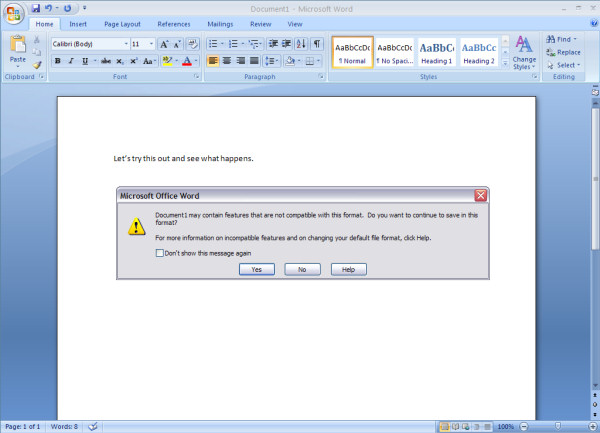
The little warning that Microsoft gives you when you try to save an Office 2007 file as ODF.

The next little surprise is that the default save format is not the same as the default load format. So after you've saved your Word document as an ODT, clicking on the Office button and selecting Open gives you the usual list of files saved in Microsoft formats. In the file selector box, under Files of type, you have to scroll to the middle to see OpenDocument Text (*.odt) -- the list is not in alphabetical order, so that entry falls below XML but above WordPerfect.

Here's how to set the default save format in SP2: Click on the Office button (the big round logo in the upper left corner) and from the bottom of the menu, select Word Options. In the dialog box, from the left pane, choose Save. Then from the list box marked Save files in this format, choose OpenDocument Text (*.odt) (in Word 2007, or its equivalent in Excel or PowerPoint). Then click on OK.

We expected to see OpenDocument given equal treatment along with PDF, the portable document standard created by Adobe and now treated as vendor-neutral. While you cannot "open" a PDF document in Word (that's to be expected, Word and Acrobat aren't exactly in the same category), you can use Save As to export an open document to a .PDF file. If you're an Adobe Acrobat Professional user, you've already had an easier option added to your Office menu by Acrobat itself: Save As -> Adobe PDF. However, for non-Acrobat users who may only have Adobe Reader, this extra step does save you the hassle of installing something like "PDF Writer" as a printer driver, and printing as a means of exporting.

Office Live services have been obviously boosted in priority with SP2. Up to now, using the Office Live add-in has resulted in adding an extra place to your Save As dialog box, enabling you to directly load and store your Office documents to your personal storage space in Microsoft's cloud. Now with SP2, Open from Office Live and Save to Office Live become prominent selections in the Office menu, and the controls for signing into your online workspace are embedded into the menu -- no shoving off to IE just for the sign-in screen.

UPDATE 5:42 pm EDT April 28, 2009 - Or maybe not. Upon further testing, we learned that the Office Live functionality does not come with SP2 right away. Rather, in our first tests earlier today, the functionality showed up on virtual systems where Office Live had been installed before, and then uninstalled. But on systems where Office Live had never been installed before, we noticed no such new functions. So evidently the SP2 package updates systems where Office Live has been registered before by way of the Office Live add-in -- which, by the way, Microsoft now also offers through Automatic Updates.

Service Pack 2 rolls up a truckload of security-related attachments and bug fixes since December 2007 -- the release date of SP1 -- and also fills an important gap in Word's and PowerPoint's functionality.

Users of Microsoft Update this afternoon noticed "The 2007 Microsoft Office Suite Service Pack 2," complete with the "The," as a high-priority or important update along with Internet Explorer 8, which is now being pushed as an operating system update for the first time.

Here's some advice for you: Download Office 2007 SP2 either from our Fileforum page or using Automatic Updates, and not from a link you find on Microsoft.com. The latter is what we did, and that choice prompted us to download the latest version of Microsoft Internet Download Manager, whose performance -- at least we hoped -- was not a foreboding of things to come. First, it crashed our Firefox browser, taking with it the active session (for that reason alone, you may want to just use IE to download SP2). But when the browser was restored, we were shown a page that merely asked us to execute the just-downloaded installer file before proceeding. Not a kind way to give us the message.

Anyway, we did that and restarted Firefox. Then we noticed that the Download Manager failed to properly register itself; had it been registered properly, it would have detected that it was supposed to handle the automatically triggered download. As it turned out, the Registry triggered Visual Studio 2008 instead, which doesn't make for a very good download platform. We exited out of that and patched the Registry manually. Then and only then were we able to make the download properly, except that for a reason we can't fathom, the Download Manager downloaded the file twice. Remind us to give Download Manager 5.17 a low Fileforum score when we get a minute.

We're continuing to dig into the new features of SP2, including the long-awaited addition of the module that adds the same new charting functionality introduced in Excel, to Word and PowerPoint. We're also looking forward to seeing whether a window updating bug that's peculiar to Nvidia drivers has been addressed. We're only moments into our examination of SP2, and we'll let you know more when we do.

Comments

View comments by with a score of at least

Microsoft software is so s***ty, and has caused me so many serious problems - so many times, that I don't even think it's worth paying for.

07 is just the same crap stupidly repacked for another upgrade cycle.

What? 280M for the service pack, AND the removal tool is a separate download.....

What was so wrong with it that it took 280 Meg of EXTRA data to fix it?

The WHOLE of Open Office (.org) is about 120meg.... and it's the ENTIRE software suit - and it's free, and it's way plenty good enough for pretty much everything.

There is NONE of this bulls*** "basic, home, academic, small business, corporate and enterprise" crippled and rip off versions either - the Perpetual Microsoft Bulls*** Trip.

Score: 0

|

Did someone force you to buy Office 2007?

Are you saying that other options just not are available for word processors and email clients?

Score: 0

|

I guess most of the users haven't noticed yet but in their wisdom MS have broken Outlooks ability to correctly connect to Exchange 2003 with this new SP. Once installed if you check your connections you will see that you have no sockets to the Directory elements of Exchange 2003. This means you cannot send an email to anyone new or utilise things like digital signitures etc. If you are unfortunate enough to have to reset up your Exchange account whilst in SP2 then you will not be able to. Well done MS you ballsed it up again!!!!
Oh by the way, the MS solution to this is to uninstall SP2 and hide it from updates, they dont see it as a fault. :/

Score: 1

|

Downloaded direct from Microsoft, using Firefox 3.5 B4 and no download manager. Download went ok. Install went really well.
Performance notably increased in Outlook. Great update and well worth downloading.

Score: 0

|

Important! After installation of the SP2, when I save to PDF the word documents with embedded Visio drawings that contain gradient color fills, the result is that the drawings in the PDF file are corrupted. The gradient fills are misplaced in a weird way.

Now I do not know what to do to fix it. Can anybody help me?

Score: 1

|

Having read the comments here, I closed Outlook before installing the SP2.
Outlook has not crashed on me yet after the install.

Score: 0

|

I think SP2 adds better i7 support, I noticed SP2 runs MUCH faster than SP1 did on my i7, especially on my huge 2GB archive file!

Score: 0

|

I heard it is pretty much a universal speedup, doesn't have to do with the processor you are using. Read some of the comments in fileforum as well.

Score: 0

|

MS borked this by not making a version of Office free ages ago. I hate dealing with ODF, ODT files and DOC, EXL, XML. I don't know what the hell to save in anymore so that people will be able to open the files! So I end up using RTF.

At Xmas, MS made Office available for like $89 (S&T version). Closest to free yet...but really..just make it free and be done with it. At least the Student and Teacher pack.

Score: -1

|

...and just how is a free Office going to give you any better insight into what format to save it?

Score: 0

|

Save as Doc and all the idiots in the land can deal with it, and anyone else can convert it to what they want.

Score: -2

|

Why save it in a patent encombered, proprietary, closed format which requires you to pay Microsoft for the pleasure of having access to your content? No thanks.

Score: 1

|

@fatty: clearly you've never had to deal with sending out a document to the pudgy-fingered contingent of society who find operating simple word processing applications beyond them. .doc is the only format where you're fairly guaranteed that the user can fill it out, save it, and send it back without stabbing all the keys in a fit of rage.
I'm not saying it's a good format, but one that it is necessary to use if you have to send stuff out to people who don't quite understand computers.

Score: 0

|

I've been saving in RTF for a while now. With some places even using Office2K and Office 97 still, it's the only thing that's guaranteed to be opened by everything.

Score: 1

|

OP: I agree. Many people recommend PDF so you get WYSIWYG, but that is not a good editable format, and it has become somewhat bas****ized by all the noncompliant pdf creation software out there.

I think .doc is a safe bet, since every WP in the past 5 years can read reliably, as well as many webapps like google doc.

Score: 0

|

"and not from a link you find on Microsoft.com. "

I had no download manager and I downloaded it from here. Then again I use Opera, so that may be the reason.

However, I have Outlook running at startup and for some reason SP2 has made it crash at every start now.

Score: 1

|

Same here. After installing Office 2007 SP2, Outlook keeps crashing when it tries to start. Now SP2 has disabled my Outlook completely. If anyone has found a solution, please let me know. Before then, I will see if I can uninstall SP2.

Score: 1

|

It should be rebuilding the OST files on first use, which may take some initial time, but thereafter, it will be faster.

Score: 0

|

outlook crash too. I open and try to get to my pst file with a crash. i have repaired and reloaded the pst several times. used my pst on a known good system and mail is fine. Has to be a conflict of interest between 2007 outlook and IE8.
**on a weird note** my unread mail link will work. i can read and reply to mail in only that area (favorites menu) if i click on the inbox or any of my folders other than unread mail.. it crashes.
ideas? is there a bug fix out for ie8 or 2007 sp2 yet? how do i determine which it is? i have rolled back to 2007 sp1; problem still exists.

Score: 1

|

I just gave SP2 a second try. Outlook still crashed every time it started. Out of the blue, I tried starting Outlook in safe-mode (by starting it while pressing the ctrl key) and, viola, it started fine. It proceeded to update all of my folders and it is working ok now.

Score: 0

|

Won't install for me.

Running Vista Ult with Office 07. Errors out at end with this: Windows Update error 80070643

Supposedly has to do with the Office Service Engine.

I followed M$ instructions to fix it and it doesn't fit it.

Score: 1

|

ODF compliance in Office 2007 SP2 is poor, see here:
http://www.robweir.com/b...on-odf-spreadsheet.html

Score: 1

|

Google Chrome 4: Yes, it's fast, but is it usable?

As Betanews readers have responded to our stories about Chrome's JavaScript superiority...Does that mean we'd actually use this browser? Well...

Video: Netflix on PlayStation 3

Netflix has come to the PlayStation 3 via Blu-ray and BD-Live.

Verizon Wireless launches new Android, Chocolate, and ruggedized phones

The lower-priced Eris joins the Droid, while the Chocolate gets a touchscreen and more music playback.

Early sales figures for Windows 7 nicely high, but do we know why?

Fans of triple-digit surges in figures quoted by Betanews will love this one, as it appears Microsoft rediscovered how to pull off a software launch.

Myka announces its latest Linux-based 'net top box'

Myka's ION brings Boxee, XMBC, and much more to HDTVs.

What hath Mac wrought? A remembrance after a quarter-century

The reason there's a Macintosh today is not because of some brilliant flash of engineering genius, but because Apple had the audacity to learn from its mistakes.

Early build of Moblin 2.1 improves connectivity, but not device support

The Linux Foundation's Atom-centric OS yesterday received a major overhaul with the project release of Moblin 2.1 for netbooks and nettops.

The iPhone's China syndrome: Sales of 5,000 and climbing

There's actually a country where Apple's device is not a godsend, where sales can be measured in the dozens.

New European counterpart to FCC will ensure 'a more neutral net'

Late Thursday night, the ruling telecom administrators of the EU's member nations signed away their final authority to a new entity overseen by the EC.

Sophos study suggests Windows 7 UAC's default setting is self-defeating

Without any anti-virus installed, a Sophos test showed, User Account Control was only capable of thwarting just one malware package out of ten samples chosen.

Indiscreet tweet trips awareness of Web SSL vulnerability

A group of high-level security engineers had been making progress on thwarting a low-level threat to the Web, until somebody blurted it all out on Twitter.

