Opera 10 beta sports a new look, 23% boosted performance
By Scott M. Fulton, III | Published June 3, 2009, 3:01 AM

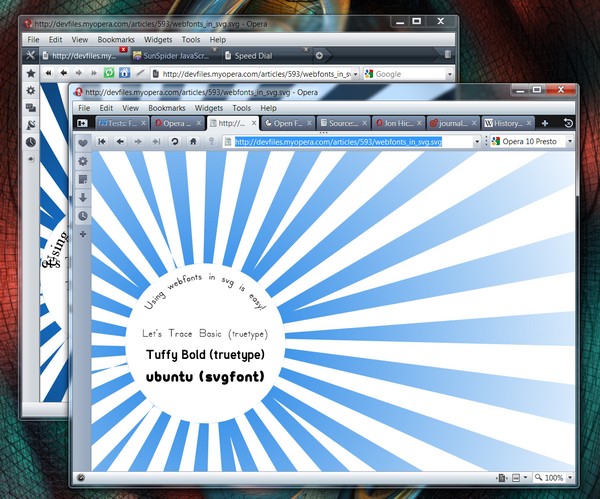
The developers at Opera Software have been publicly working with version 2.2 of the Presto rendering engine for its premier Web browser since last December. Their goal has been to implement Web fonts for Scalable Vector Graphics without sacrificing performance or other standards support. Conceivably, this could allow sites to deploy both TrueType and SVG fonts in user-scalable sizes scaled to fit the current window size, as this recent Opera test pattern demonstrates. (Right now, Firefox 3.5 Beta 4 supports some scalable TrueType, but not to the degree that Opera does.)
It's an impressive renderer, and in early Betanews tests, it appears to be the engine of a snappy and stable browser. But Opera 10 may not have an opportunity to be released to the public before Mozilla cuts the ribbon on Firefox 3.5. When that day arrives, Opera 10 could flip-flop from being 28% ahead of Mozilla in overall performance to being 57% behind it, according to performance tests on a physical platform. More about those numbers later. In the meantime, Opera users will need to be satisfied with what is, without a doubt, a better Opera browser. The first Opera 10 Beta is now officially released, and right away, testers and Opera fans will notice a big difference: a new default skin, developed by new Senior Designer Jon Hicks.
The new look lacks the distinctive glassy edginess that characterized Opera 9.5 and later editions, replacing it with a cooler, softer shade of grey that, while less original, may be easier for users to discern…maybe. The emblems on some buttons have changed, though their meanings are the same: For instance, the wrench-and-screwdriver icon from 9.5 that brought up the Panels bar along the left side (one of Opera's better contributions) is replaced with an icon that looks like a panel opening to the right. And the trash can icon that represented closed tabs that the user may restore, is replaced with a recycle-like arrow that rotates counter-clockwise, although the "Empty Trash" command is still available by that name from that icon.
Tabs in the new default skin are rounded, and arguably look more like tabs. The big surprise -- and certainly Opera's latest submission to the "Now, Why Didn't We Think of That?" department -- is the vertically resizable tab bar. Dragging the grabber down reveals thumbnails of the latest snapshots of the visible open tabs.

This is one of those "Aha!" features that could draw new users to Opera, at least until Firefox or another browser appropriates it. You don't have to reveal the entire thumbnail, so you don't have to consume too much space. Granted, as I've said before in our reviews of Mozilla's mobile browser experiment Fennec, thumbnails aren't always representative of their content. But they do represent multiple open pages more effectively than just their "favicon" icons (which disappear when you drag the tab bar down).
Now, such a feature will probably preclude any type of add-on that enables enabling tabs to appear in multiple rows. But that might be a fair tradeoff, and in the same vein as Microsoft's changes to the taskbar in Windows 7, Opera's new tab bar could start a fashion trend.
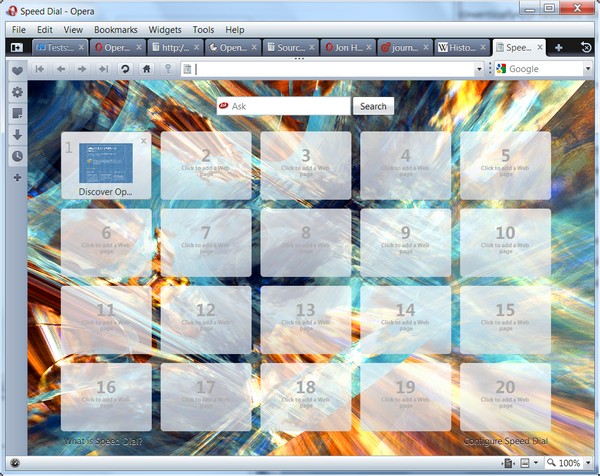
All of a sudden, Firefox is actually behind the ball with respect to an issue it was supposed to have owned: the contents of a newly created tab. While Firefox 3.5 Beta 4 introduces the public for the first time to "favorites" concepts Mozilla Labs began experimenting with last year, Opera is adding some intriguing new features to the Speed Dial feature it introduced in version 9.5. Now you can alter the size of the Speed Dial grid to as much as 5 x 5, and pull up a custom background from your hard drive.
Next: Opera Software claims a 40% speed boost

yea..........
Score: 0
|Opera rocks, just kidding. I'm trying it out, it's not bad, but in the good old days, that would two years back it really did rock. Now I'm spoiled for choice, Chrome is without a doubt the best, I think all here will agree to that. Firefox is now slow, I'm sure some alpha or such will already be reaching the speed of light, but the Firefox versions we normal folk use are slow. So I see a chance at last for Opera to start clawing back some of those who deserted it. OK gang all over to the Firefox forum, and tell 'em their browser sucks, are you with me ? Oh well please yourself, I'll go on my own.
Score: -1
|sweet new tab experience but I still stick with my Firefox and New Tab King (http://www.newtabking.com) experience - I love the stats
--shelly
Score: 0
|i kind of love Opera but it has fallen from the table since it is *no longer developing towards users, but against other browsers* and not precisely where it should (besides performance).
Non-Opera users are asking for some features that would make them switch or -come back- but developers don't care at the slightest. Extensibility, customization and user-friendliness are the holy grail today but they refuse to listen to that.
They are still adding odd new features and implementing in their own fasion other advancements made by others, which just keeps taking them very much into the point of "i'm the best but nobody likes me". And then they go get jumpy about their user share and bark at everything. No. It's not that way, Opera.
They have to listen to the major user claims. or they will keep fighting like the underdog by themselves forever.
Score: 1
|Well, that's good! I'd use Opera as a secondary browser, if it weren't for a couple things concerning the interface & RSS feeds.
Browser competition's good and users reap the benefits...esp., people on dial-up like me. I like my Minefield with my custom theme & multiple row bookmarks toolbar- with the bottom loaded up with RSS feeds for quick surfin'.
I'm always going over & checking on Opera, though.....maybe, one of these days....
Score: 0
|As much as it sounds horrible, Opera won't be my default browser. I tried it for several weeks while waiting for Firefox 3.0 and, as good as it was, it just didn't work correctly enough of the time to put away Firefox.
The Opera team will continue to bring innovations, but it's just a little bit off the mark for most of the world. Even if it was the default browser on most systems, I think people would decide to find if something else was available, for the first time. Still, I'll use it ahead of Safari on Mac OS X because it handles those quirky IE-specific sites better.
Score: 0
|@mjm01010101 opera is able to block ads!! i don't know when i've last seen an ad!
http://www.fanboy.co.nz/adblock/opera/
Score: 0
|Dayum. It works. I'll stick with.
Score: 0
|ok how do I start the browser up with 4+ tabs, every time?
Also it isn't importing my bookmarks from FF correctly.
Score: 0
|It took Opera long enough to beat Firefox.
Score: -3
|It sure does beat Fx in freezing up and crashing.
Opera just does not cut it yet but do enjoy your delusion.
Score: 0
|"Now, such a feature will probably preclude any type of add-on that enables tabs to appear in multiple rows."
*Psst* It's not an add on. The browser can already do that :) Just right click on the tab bar, Customize->Appearance
Change "Wrapping" to "Wrap to multiple lines".
Alas yes, this does break the draggy tab thumbnaily things. We shall see if they change that or not.
One feature you missed was Turbo (icon in bottom left of the browser page) which compresses pages through Opera's servers to reduce bandwidth and minimise page download time. Could be a very good feature for those on capped bandwidth (like most of the UK).
A new JavaScript engine is on the way, but rather frustratingly it won't be in Opera 10.
Score: 0
|i have found my new browser :) IMO firefox has been on the decline and google chrome still doesn't work well on all sites.
but opera has got the performance and comparability i need
Score: 0
|Meh, without adblock + / noscript, won't even bother with trying another browser. And every time someone says Opera can block ads, and every time they link to some obscure site that show how to block ads in Opera, yet provides about 40% of the functionality and ease of adblock+.
Score: 0
|Try Privoxy. It blocks just as many ads as Ablock Plus. The only annoyance is that some of the blocked ads get replaced with placeholders instead of being hidden completely.
Score: 0
|Part of the beauty of adblock is how easy it is to set up, update, and manage. You can disable it on certain sites with a few clicks, update it...all without having to leave the application or dig around in config files to get it done.
What we're waiting for is an alternative browser with that kind of functionality....not a browser *and* a 3rd-party proxy.
Score: 0
|Opera offers "noscript" features OUT OF THE BOX, as to adblocking, hosts file>any browser based solution PERIOD.
adblock/adblock+ have some serious downsides, one being that sites can DETECT THEM and BLOCK YOU FOR USING THEM, where a hosts file just re-directs the adds to your system, so they cant load(as if their host server was down) also this means you dont use ANY BANDWIDTH to load stuff that your not going to display.
http://blocklistpro.com/
go there, get the hosts manager, IT WORKS ON VISTA, you just have to dissable visual styles using compat settings(rclick icon for hosts manager>compatibility>check the disable visual styles box)
i have used this for YEARS and its far better then any solution your going to find built into any browser as it also can be used to block things other then ads, with a good hosts file I never see those inline text link ads or the like, I also can block malware and other malitious sites.
I also block some software sites to get around their annoing update notifications(some apps dont let you disable their update checks)
Just my opinion but adblock is crap compaired to a good hosts file :)
Score: 0
|@AzueSky: Using a hosts file will not remove the spot where the ad is. Adblock not only removes the ad, it removes the void that gets left behind. I've not seen any other solution do that. And too many entries in the hosts file can slow down a computer. I've found that out.
Score: 0
|*laughing*
Yeah...
So the host's file can be updated through the browser in just a few clicks? Does it update automatically?
It can whitelist and disable/re-enable in just a few clicks through the browser?
No?
And BLM... Two separate, 3rd party apps to provide a *limited* subset of the functionality of *one* extension? Seriously?
Not really a comparable solution....
Props to "mjm" for predicting your response though...
"And every time someone says Opera can block ads, and every time they link to some obscure site that show how to block ads in Opera, yet provides about 40% of the functionality and ease of adblock+."
Score: 0
|I respect the results in the fact that using the methods detailed the advised speed gain was noticed, however, the question on my mind is how relevant will this be? I mean, a user on a comcast connection in an area where the cable quality is low will likely experience lag when compared to someone on a FIOS connection or a dedicated line at a corporation. Speed is all about relevance. What is fast on one machine/connection isn't universal across all platforms. Opera might be faster, but what is gains in speed it loses in functionality customizability, and overall ease of use when trying to configure certain aspects of the browser or perform rather common tasks (Autocomplete anyone?).
One suggestion to BN, please, make a page where you detail your hardware configuration, connection stats, and other pertinent info so you don't have to either repeat it or restate it, but you can instead post a link at the end of each article. Also, you REALLY do not have to state "Physical Platform" in every article. I realized we jumped on you for this, but creating a page about the configuration of said platform and adding it to the end of each article will eliminate that question.
Score: 0
|what are you talking about with reguards to configuaring certen aspects of the browser?
I havent had any prolems, opera is VERY VERY customizeable, far more so then any other browser including FF and K-Meleon.
only problems I ever have are beta upgrade issues, and those tend to get ironed out by the time the browser goes into RC stages.
Score: 0
|Next: Opera Software claim 70% speed boost, blink and you'll miss it :P all of these claims are getting rather stupid now
IE8 could use a little work though
Score: 2
|As a user, with modern CPUs and bandwith, I am more worried about the launch time and responsiveness of my browser at this point. That's one area where IE8 is horrible IMHO - from launching it to having it ready to let you type a new URL, it can take a long time even on a fast computer. Type the URL too fast, and it gets overwritten by the homepage. You can't even resize the window until it has fully completed loading the homepage - the whole UI will freeze for 1-2 secs during the process.
Responsiveness is something you start to appreciate after a few years on Firefox. Anytime I have to go back to IE for some reason, it frustrates me.
Score: 0
|