Login:
Password:

Russinovich's Windows toolkit goes live, quite literally

By Scott M. Fulton, III, BetaNews

May 29, 2008, 1:05 PM

Admins now have immediate access to any of Sysinternals utilities from any Windows computer, without having to install anything first.

There really aren't all that many EXE files that people would automatically feel are safe enough to run from a remote Internet server, directly from the command line. But probably taking up most of the spaces on that short list are the invaluable utilities of Mark Russinovich, who maintains the Sysinternals brand now for Microsoft.

Even though it's Symantec that absorbed Peter Norton's brand, it's Russinovich who has clearly assumed his mantle. Chances are, Mark has probably left his Windows utilities live and exposed on one of his servers, just so he can have access to them from anywhere.

With Microsoft's recent push toward making more of its applications "live," at some point, it probably struck Mark that he could follow right along with only about two minutes of total development time. So yesterday, in sync with the release of the latest version 11.20 of Process Explorer, Sysinternals has made its entire library of .EXE executables and .CHM help files very, very live. Now, you can run any of them remotely from any Windows XP- or Vista-based computer using nothing more than the CMD.EXE command prompt, without installing anything on that computer at all.
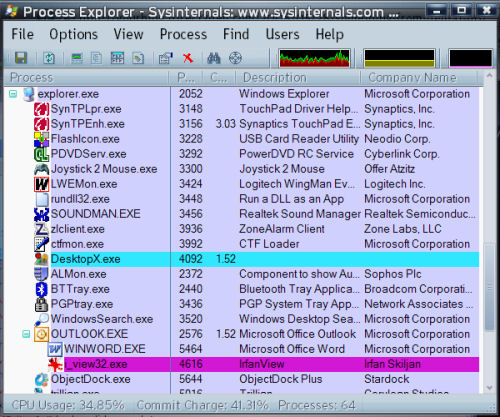
Mark Russinovich's Process Explorer, running 'live' without even having to be installed.

In other words, go into your command prompt, type \\live.sysinternals.com\tools\procexp.exe, wait about one minute, and suddenly, there's Process Explorer running on your system.

The extreme live-ness of this toolset -- which is free from Microsoft anyway -- means that you can run a utility like Process Explorer, Process Monitor, or Access Check from any sluggish or poorly running system, without having to spend time trying to install files on that system first. As a side benefit, if you use your Web browser to go to live.sysinternals.com, you'll have quick-and-dirty access to all of Mark's latest, the moment it's published.


Download Sysinternals Suite Build 5/28/08 from FileForum now.

Add a Comment (18 Comments)

BetaNews reserves the right to remove any comment at any time for any reason. Please keep your responses appropriate and on topic. Foul language and personal attacks will not be tolerated.

Name (required):

E-mail (required):

Enter Your Comment:

By ingram091

edited May 29, 2008 - 7:57 PM

lol thats just about what we all said when we have been having the entire LIVE concept pounded into our heads non stop for the last several months...

Huh? ok.. whatever floats your skirt MS. lol

The only thing that I am kinda worried about is that the free standalone package may not be available at some point. so I suggest archiving it NOW just to be sure while all of it is still available...

The only thing I can see that makes this handy is you can code a webpage or a control panel into something like a flash drive that has links to all the tools you need from the web. Ok great, but lets face facts here. Often when your using Process explorer, your prob dealing with malware of some kind and the best way to be rid of it is to kill it while OFFLINE. so Live seems kinda silly at that point does it not? IDK.

I like that is can so easily be incorporated into Live functionality, But I still want my valued System tools to have offline functionality. Just my opinion.

I do have to admit however Sysinternals is my PCTools of today. lol The Symantec original concept lives in Sysinternals tools, and thats 100% thanks to Mark Russinovich. Anyone that has used the admin kits or erd commander can see that Sysinternals has the tools and skill to be the MUST HAVE programs in your toolkits... just as in its day PCTools was all those many years ago...

Score: 0

By dhjdhj

posted May 29, 2008 - 3:23 PM

What am I missing --- seems no different than clicking on an executable from any website at which point it will download and run?

Score: 0

By SaferNetworking

posted May 29, 2008 - 3:22 PM

And now, it's just a question of time until malware get's "live" as well.

I mean - this obviously isn't meant to bookmark and use, but to run on machines where you haven't got the tools yet, where you'll type the URL from memory.

If you visit a page to download a tool, you at least can recognize a typo in the URL by recognizing the fake page.

But if you're running code from a URL that includes a typo, you'll notice it only AFTER the code has executed.

How long will it take until the first malware appears on \\live.szsinternals.com\tools\procexp.exe or \\live.sysinternal.com\tools\procexp.exe ?

The very small benefit of saving two clicks to download something and run it are discarded for the huge disadvantage of Microsoft teaching people that it's ok to run code directly from the Internet (hello???).

Isn't it hard enough to educate people to not click dialog-like image banners that advertise necessary system updates?

And don't tell me you've never mistyped a URL, everybody does that from time to time.

Score: 0

By belthurgp

posted May 29, 2008 - 2:04 PM

As said above, in the 90's my tools were Nu.exe,ne.exe etc..basically norton tools which saved many a day and were permanent fixtures on my troubleshooting floppy.

Now it's mark's tools on my tiny USB. Thank you Microsoft and Mark for not messing around with the tools like Symantec did ! They really messed up. Only thing Symantec tools now does is kill a computer...

Score: 0

By Paul Skinner

posted May 29, 2008 - 2:09 PM

Except Symantec's uninstaller.

Now that's a quality bit of software.

Score: 0

By cowgaR

edited May 29, 2008 - 4:32 PM

though Total Uninstall is the best there is...

but probably you are talking about things which weren't installed through 3rd party application, never tried symantec uninstaller (steered away from their tools couple of years ago...ruled in DOS-Norton times though)

Score: 0

By cool_guy

edited May 30, 2008 - 7:21 AM

I think he meant Norton's Removal Tool. It removes broken and even non broken Norton installations. I once tried to uninstall Norton's Internet Security on a Vista but it kept failing. Norton's Removal Tool worked really well. A must have tool for any IT pro :)

Score: 0

By daq

posted May 29, 2008 - 2:20 PM

Their corporate products are a level above everybody else. Barely noticeable, but extremely effective. Also very easy to uninstall if you ever decide you like viruses.

Score: 0

By Paul Skinner

posted May 29, 2008 - 5:05 PM

I have to say when I last used Symantec, their coporate antivirus wasn't too bad when it came to resources. That was in 2003 though.

Score: 0

By Paul Skinner

posted May 29, 2008 - 1:55 PM

That's crazy!

Mark Russinovich is brilliant.

Score: 0

By cowgaR

posted May 29, 2008 - 1:46 PM

isn't working, vista, std user, cmd prompt...

more information about how this magic works? (behind FWs and such...)

Score: 0

By daq

posted May 29, 2008 - 2:21 PM

You probably can't run them as a standard user. Try running command prompt with elevated privileges.

Score: 0

By cowgaR

posted May 29, 2008 - 2:35 PM

the format of the specified network name is invalid...

vista ultimate, admin priviledges on cmd prompt

I'm sure I am able to solve it just I am in mood to follow an article and its "descriptive" steps...

what about remote settings ;)

Score: 0

By Floodland

edited May 29, 2008 - 1:54 PM

Not magic at all. It worked from a firewalled connection which only have connectivity trough a restrictive proxy... Great tool! On XP, of course :-)
If you cannot access Browse directly to live.sysinternals.com and open any tool from there, not big deal.

Score: 0

By cowgaR

edited May 29, 2008 - 2:31 PM

that way I only download it ;)
I don't want to download it, I could do it before as well...

firefox...vista

Score: 0

By Floodland

edited May 29, 2008 - 4:14 PM

If you expect to run anything without binaries on YOUR computer you maybe do not understand how windows (and computers) work...
You would do it the same way as before... The shortcut only make download it, but with a click easier, again, not big deal, but anti MS philosophy, useful! You still HAVE to download the binary!

Score: 0

By cowgaR

edited May 29, 2008 - 4:35 PM

yeah I am completely out of the topic...why don't you teach me? :)

the point of "live" is to do one command and all is working, no hassle...

so no download, choose folder, find it/run it or install it (sometimes), ok?

think about scripts ;)

Score: 0

By Lick

posted May 29, 2008 - 1:44 PM

Now thats cool. It works!

Score: 0